
Toll Free: 1800256843   |   info@pixiepartners.com.au
  • Follow
  • Follow
  • Follow
  • Follow
  • PIXIE Products
  • Integration Products
    • PIXIE Ambience Touch Panel
    • PIXIE Blind and Signal Controller
    • PIXIE Dual Relay Controller
    • PIXIE Translator – Dry Contact Input Controller
  • Support
    • PIXIE Smart Spaces
    • PIXIE Offers for Electricians
    • Smarthome News
    • PIXIE Smart Home Encyclopedia
  • Downloads
    • Datasheets + Installation Manuals
    • Wiring Diagrams
    • Technical + How To Docs
  • Contact
    • SAL PIXIE Training Signup
    • Free PIXIE Smarthome Design
    • PIXIE Apps
  • Login
  • Partners
    • My Account
    • PIXIE Offers for Electricians
    • PIXIE Points Claims
    • Rewards Cart
    • Rewards Products
    • Checkout
Join Today

How can we help you?

Popular Search gatewaysensorsonostouch panelflickering

Home Owner

  • All I need is a smart home design right now . Do you offer free designs?
  • Can I change the colour of the LED indicators on my buttons?
  • Can I control each socket on the Double Power Point seperatley?
  • Can I control my home when I am away?
  • Can I speak to a real person for some help?
  • Can I upload my own photos onto the PIXIE Touch Panel?
  • Can I use PIXIE dimmers, switches and timers without Bluetooth?
  • Can I use PIXIE switches and dimmers without Bluetooth control?
  • Can you personalise the PIXIE APP?
  • Do Hager Silhouette, Allure and Finesse wall plates work with PIXIE?
  • Do PIXIE switches only work with SAL downlights?
  • Does PIXIE fit into iconic®?
  • Does PIXIE fit into Saturn®
  • Does PIXIE fit into Zen®
  • DOES PIXIE HAVE AN API
  • Does PIXIE still operate if I lose my phone or my phone battery is flat?
  • Does PIXIE work with air conditioning systems?
  • Does PIXIE work with Amazon Echo, Google Home, Apple Home Kit, Samsung SmartThings?
  • Does PIXIE work with and fit into Hager plates?
  • Does PIXIE work with Breezeway™ Powerlouvre™ Windows
  • Does PIXIE work with Heated Towel Rails?
  • Does PIXIE work with Intercom Systems and Video Doorbells?
  • Does PIXIE work with Intercom Systems?
  • Does PIXIE Work With Mitsubishi Air Conditioning Systems?
  • Does PIXIE work with MORITZ Blind and Curtain Motors
  • Does PIXIE Work with Smoke Detectors – Smart Smoke Detectors Australia
  • Does PIXIE work with Sonos?
  • Does PIXIE work with Spotify?
  • Does the PIXIE SDD300BTAM dimmer work with SAL flickerGUARD lights
  • Getting started – how to create a home in the PIXIE App
  • Google Home has stopped working unexpectedly Why?
  • How can I get some help?
  • How do I activate/deactivate Child Lock function on the Double Power Point?
  • How do I change the dimmer off and on fade rate (dimmer slow on and off)
  • How do I set a minimum dim level for my lights?
  • How Does PIXIE Integrate with DaHua IP Intercom Systems?
  • HOW DOES PIXIE WORK WITH APPLE HOMEKIT
  • How does PIXIE work with BigAss Fans?
  • How does PIXIE work with HIK Vision Intercom Systems?
  • How does PIXIE work with Home Assistant
  • HOW DOES PIXIE WORK WITH MATTER?
  • How Does PIXIE Work with ZETR Switch Grids
  • How does the PIXIE system work wirelessly?
  • How does the PIXIE Touch Panel work?
  • How to add more family members to control your PIXIE Plus home
  • How to control devices with the PIXIE App
  • How to control sensors with PIXIE
  • How to create and use Groups and Scenes in the PIXIE App
  • How to create schedules in the PIXIE App
  • How to Pair PIXIE Scenes to a Multifunction Controller
  • How to Pair PIXIE Scenes to a Multifunction Controller SMF-BTAS
  • How to setup Google Home with PIXIE Plus for voice control
  • How to Setup Mobile Device Widgets with PIXIE PLUS
  • How to Setup SIRI Shortcuts with PIXIE PLUS
  • How to Sync Music to my PIXIE App and RGB LED Strip
  • I can’t connect my Google Nest WiFi to my PIXIE Gateway
  • I have lost my device from the PIXIE App. Why?
  • I’m experiencing issue savings scenes or activating scenes via voice control
  • Introducing PIXIE 2022
  • My lights are dimmed really low, how do I make them immediately go to full?
  • My PIXIE dimmer stopped working
  • My SAL Pixie App could not find any devices on my phone?
  • PIXIE CLIMATIQ and How PIXIE Works with DAIKIN Ducted Air Conditioning Systems
  • PIXIE PLUS PROGRAMode – The Complete Guide
  • PIXIE Sensors
  • What brochures are available for PIXIE to give my customers?
  • What do the lights on my PIXIE Gateway mean?
  • What happens to my PIXIE smart home if the power goes out?
  • What is in the PIXIE Touch Panel Value Kits
  • What is MASTERlink and How to Use It
  • What is RippleShield Technology
  • What is the SWL10L and SBP10L non smart mechs for?
  • What voice assistants and internet services does SAL Pixie operate with?
  • What wall plates does PIXIE fit into?
  • What will happen to my schedules if I turn off my phone, or if I take my phone out? Will the “schedule” keep working?
  • What’s the difference between the PIXIE App and the PIXIE Plus App?
  • Where do I download the PIXIE Apps?
  • Which Ceiling Fans Does PIXIE work with?
  • Why are my LED Lights flickering?
  • Why can’t I find any PIXIE devices when I use an Android phone?
  • Why can’t I update firmware on PIXIE devices
  • Why does my PIXIE system not work reliably?
  • Why is my PIXIE app not connecting when opened?
  • Why is my PIXIE dimmer switch showing blue red and white
  • Will PIXIE work with my mobile phone?

Installation

  • Advanced Troubleshooting for Electricians and Systems Integrators #1
  • All I need is a smart home design right now . Do you offer free designs?
  • Can I change the colour of the LED indicators on my buttons?
  • Can I control my home when I am away?
  • Can I speak to a real person for some help?
  • Can PIXIE control garden lights?
  • Can the LT8915DIMBT and LT8915RGBBT be used with any LED strip from any manufacturer
  • Can the PIXIE switch control a ceiling sweep/cooling fan?
  • Do Hager Silhouette, Allure and Finesse wall plates work with PIXIE?
  • Do I need to PAIR a multi-function device to enable operation?
  • Do I need to PAIR a two-way switch *S2WBT* device to enable operation?
  • Do SAL PIXIE Bluetooth devices operate with Bluetooth mesh?
  • Does PIXIE still operate if the internet stops working?
  • Does PIXIE work with air conditioning systems?
  • Does PIXIE work with Amazon Echo, Google Home, Apple Home Kit, Samsung SmartThings?
  • Does PIXIE work with and fit into Hager plates?
  • Does PIXIE work with Breezeway™ Powerlouvre™ Windows
  • Does PIXIE work with DALI and DALI2?
  • Does PIXIE work with Heated Towel Rails?
  • Does PIXIE Work with Hunter Pacific International Ceiling Fans?
  • Does PIXIE work with Intercom Systems and Video Doorbells?
  • Does PIXIE Work With Mitsubishi Air Conditioning Systems?
  • Does PIXIE work with MORITZ Blind and Curtain Motors
  • Does PIXIE work with Rollease Acmeda blinds?
  • Does PIXIE Work with Smoke Detectors – Smart Smoke Detectors Australia
  • Does PIXIE Work With Ventair Fans
  • Does the PIXIE SDD300BTAM dimmer work with SAL flickerGUARD lights
  • Does the SAL PIXIE timer *STC/BT* require a PIXIE switch or dimmer to operate?
  • Does the SDD300BTAM need to be de-rated in multi-gang plates?
  • Getting started – how to create a home in the PIXIE App
  • How can I boost the range of my Bluetooth® Mesh?
  • How can I get some help?
  • How do I change the dimmer off and on fade rate (dimmer slow on and off)
  • How do I control loads more than 600Watts with PIXIE?
  • How do I create a GEOFENCE with PIXIE?
  • How do you wire a relay or contactor with an SWL350BT Smart Switch?
  • How Does PIXIE Integrate with DaHua IP Intercom Systems?
  • How does PIXIE work with BigAss Fans?
  • How does PIXIE work with HIK Vision Intercom Systems?
  • How Does PIXIE Work with ZETR Switch Grids
  • How does the PIXIE system work wirelessly?
  • How does the PIXIE Touch Panel work?
  • How many SFI enabled lights can be controlled per SDD400SFI Dimmers
  • How to Control a PIXIE sensor with a PIXIE sensor – PIXIE Sensor 2 way Control
  • How to do 2 way and 3 way control with PIXIE
  • How to make a PIXIE Sensor Timeout longer than 30 minutes?
  • How to Pair PIXIE Scenes to a Multifunction Controller
  • How to Pair PIXIE Scenes to a Multifunction Controller SMF-BTAS
  • How to perform Bluetooth Mesh Signal Strength test in the PIXIE App
  • How To Set Up a PIXIE Blind Controller for Motorised Blinds in your Smart Home
  • How to Setup and use the PIXIE Translator – PC100T-R-BTAS
  • How to setup Sunrise and Sunset Schedules
  • How to Sync Music to my PIXIE App and RGB LED Strip
  • How to Update Firmware in PIXIE Devices
  • How to use BELL PRESS or BP inputs and outputs on PIXIE Devices
  • How to use PIXIE Smart dimmers and switches with PRESTIGE plates
  • How to use the PC100T-R-BTAS ( PIXIE Translator ) as a Booster
  • I can’t connect my Google Nest WiFi to my PIXIE Gateway
  • I have lost my device from the PIXIE App. Why?
  • I’m hearing a noise from my PIXIE product, why?
  • In PIXIE app, there is a group control function. Do all the grouped PIXIE products have to be installed on the same eletrical circuit?
  • My Merlin garage door only works some of the time. How do I make it work 100% of the time with PIXIE?
  • My PIXIE dimmer stopped working
  • My PIXIE Gateway Firmware update stuck
  • My PIXIE Switch Doesn’t Hold
  • My PIXIE switch turn on and then off again right away. Why?
  • My SAL Pixie App could not find any devices on my phone?
  • PIXIE CLIMATIQ and How PIXIE Works with DAIKIN Ducted Air Conditioning Systems
  • PIXIE PLUS PROGRAMode – The Complete Guide
  • PIXIE Sensors
  • Using Samsung SmartThings with PIXIE to Control More Devices
  • What happens to my PIXIE smart home if the power goes out?
  • What is a load correction device or CAPACITOR used for with PIXIE?
  • What is MASTERlink and How to Use It
  • What is RippleShield and how does it work with PIXIE?
  • What is RippleShield Technology
  • What is the best way to dim LED Strip
  • What is the signal distance of a PIXIE Bluetooth device?
  • What is the SWL10L and SBP10L non smart mechs for?
  • What the difference between the PIXIE STCBT timer and PIXIE STS350BT smart timer switch?
  • What training is available for PIXIE?
  • What voice assistants and internet services does SAL Pixie operate with?
  • What wall plates does PIXIE fit into?
  • What’s the difference between the PIXIE SDD300BTAM and the SDD400SFI
  • What’s the difference between the SMF/BT and S2W/BT?
  • Where do I find my PIXIE training voucher code?
  • Why are my LED Lights flickering?
  • Why do my PIXIE switches keep blowing / failing / popping?
  • Why does my PIXIE system not work reliably?
  • Why is my PIXIE app not connecting when opened?
  • Will PIXIE work with my mobile phone?

Integration

  • Advanced Troubleshooting for Electricians and Systems Integrators #1
  • Can I integrate PIXIE with my CBUS®, Dynalite®, Control4® System?
  • Can I speak to a real person for some help?
  • Can I use PIXIE to control my projector screen?
  • Can the LT8915DIMBT and LT8915RGBBT be used with any LED strip from any manufacturer
  • Does PIXIE allow me to do 2way and 3way switching?
  • Does PIXIE have a public API/SDK to integrate with?
  • Does PIXIE still operate if the internet stops working?
  • Does PIXIE work with air conditioning systems?
  • Does PIXIE work with Amazon Echo, Google Home, Apple Home Kit, Samsung SmartThings?
  • Does PIXIE work with Breezeway™ Powerlouvre™ Windows
  • Does PIXIE Work With Daikin
  • Does PIXIE work with DALI and DALI2?
  • Does PIXIE work with Heated Towel Rails?
  • Does PIXIE work with Intercom Systems and Video Doorbells?
  • Does PIXIE work with Intercom Systems?
  • Does PIXIE Work With Mitsubishi Air Conditioning Systems?
  • Does PIXIE work with MORITZ Blind and Curtain Motors
  • Does PIXIE work with Rollease Acmeda blinds?
  • Does PIXIE Work with Smoke Detectors – Smart Smoke Detectors Australia
  • Does PIXIE work with SOMFY blinds?
  • Does PIXIE work with Sonos?
  • Does PIXIE work with Spotify?
  • How can I get some help?
  • How do I create a GEOFENCE with PIXIE?
  • How Does PIXIE Integrate with DaHua IP Intercom Systems?
  • How does PIXIE work with BigAss Fans?
  • How does PIXIE work with HIK Vision Intercom Systems?
  • How does PIXIE work with Home Assistant
  • How to Control a PIXIE sensor with a PIXIE sensor – PIXIE Sensor 2 way Control
  • How to control sensors with PIXIE
  • How To Set Up a PIXIE Blind Controller for Motorised Blinds in your Smart Home
  • How to Setup and use the PIXIE Translator – PC100T-R-BTAS
  • How to use and Set Up PIXIE Portal – Long Distance BT Mesh Booster System
  • How to use BELL PRESS or BP inputs and outputs on PIXIE Devices
  • My Merlin garage door only works some of the time. How do I make it work 100% of the time with PIXIE?
  • PIXIE CLIMATIQ and How PIXIE Works with DAIKIN Ducted Air Conditioning Systems
  • PIXIE Sensors
  • Using Samsung SmartThings with PIXIE to Control More Devices
  • What automatic blinds does PIXIE work with?
  • What garage doors does PIXIE work with?
  • What is MASTERlink and How to Use It
  • Which Ceiling Fans Does PIXIE work with?
  • Air conditioning
    • Does PIXIE work with air conditioning systems?
    • Does PIXIE Work With Daikin
    • Does PIXIE Work With Mitsubishi Air Conditioning Systems?
    • PIXIE CLIMATIQ and How PIXIE Works with DAIKIN Ducted Air Conditioning Systems
  • Blinds
    • Does PIXIE work with MORITZ Blind and Curtain Motors
    • Does PIXIE work with Rollease Acmeda blinds?
    • Does PIXIE work with SOMFY blinds?
    • How does the PIXIE Touch Panel work?
    • How To Set Up a PIXIE Blind Controller for Motorised Blinds in your Smart Home
    • How to use BELL PRESS or BP inputs and outputs on PIXIE Devices
    • Using Samsung SmartThings with PIXIE to Control More Devices
    • What automatic blinds does PIXIE work with?
  • Ceiling Fans
    • Can the PIXIE switch control a ceiling sweep/cooling fan?
    • Does PIXIE Work with Hunter Pacific International Ceiling Fans?
    • Does PIXIE Work With Ventair Fans
    • How does PIXIE work with BigAss Fans?
    • How does the PIXIE Touch Panel work?
    • What types of fans can I control with PIXIE?
    • Which Ceiling Fans Does PIXIE work with?
  • Garage Doors
    • How to use BELL PRESS or BP inputs and outputs on PIXIE Devices
    • My Merlin garage door only works some of the time. How do I make it work 100% of the time with PIXIE?
  • Intercom
    • Does PIXIE work with Intercom Systems?
    • How Does PIXIE Integrate with DaHua IP Intercom Systems?
    • How does PIXIE work with HIK Vision Intercom Systems?
  • Music
    • Does PIXIE work with Sonos?
    • Does PIXIE work with Spotify?
  • Sensors
    • Does PIXIE Work with Smoke Detectors – Smart Smoke Detectors Australia
    • How to Control a PIXIE sensor with a PIXIE sensor – PIXIE Sensor 2 way Control
    • How to control sensors with PIXIE
    • How to make a PIXIE Sensor Timeout longer than 30 minutes?
    • PIXIE Sensors

PIXIE Apps

  • Advanced Troubleshooting for Electricians and Systems Integrators #1
  • Can I upload my own photos onto the PIXIE Touch Panel?
  • Can you personalise the PIXIE APP?
  • Does PIXIE still operate if I lose my phone or my phone battery is flat?
  • Getting started – how to create a home in the PIXIE App
  • How to Add Devices in the PIXIE App
  • How to add more family members to control your PIXIE Plus home
  • How to Control a PIXIE sensor with a PIXIE sensor – PIXIE Sensor 2 way Control
  • How to control devices with the PIXIE App
  • How to create and use Groups and Scenes in the PIXIE App
  • How to create schedules in the PIXIE App
  • How to give family members control of your PIXIE home from their phones.
  • How to Pair PIXIE Devices in the PIXIE App
  • How to Pair PIXIE Scenes to a Multifunction Controller
  • How to Pair PIXIE Scenes to a Multifunction Controller SMF-BTAS
  • How to perform Bluetooth Mesh Signal Strength test in the PIXIE App
  • How to setup Google Home with PIXIE Plus for voice control
  • How to Setup Mobile Device Widgets with PIXIE PLUS
  • How to transfer from the PIXIE App to the PIXIE Plus App
  • How to update firmware in PIXIE devices from the PIXIE App
  • I can’t connect my Google Nest WiFi to my PIXIE Gateway
  • Using Samsung SmartThings with PIXIE to Control More Devices
  • What is MASTERlink and How to Use It
  • What will happen to my schedules if I turn off my phone, or if I take my phone out? Will the “schedule” keep working?
  • What’s the difference between the PIXIE App and the PIXIE Plus App?
  • Where do I download the PIXIE Apps?
  • Why can’t I find any PIXIE devices when I use an Android phone?
  • Why can’t I update firmware on PIXIE devices
  • Why does my PIXIE system not work reliably?
  • Why is my PIXIE app not connecting when opened?
  • Will PIXIE work with my mobile phone?

PIXIE Training

  • Having trouble registering or logging into PIXIE training
  • How much does PIXIE training cost?
  • How to Control a PIXIE sensor with a PIXIE sensor – PIXIE Sensor 2 way Control
  • What training is available for PIXIE?
  • What’s the difference between the PIXIE online training and face to face training?
  • Where do I find my PIXIE training voucher code?

PIXIE Works With

  • Can I integrate PIXIE with my CBUS®, Dynalite®, Control4® System?
  • Can I use PIXIE to control my projector screen?
  • Does PIXIE have a public API/SDK to integrate with?
  • DOES PIXIE HAVE AN API
  • Does PIXIE work with air conditioning systems?
  • Does PIXIE work with Amazon Echo, Google Home, Apple Home Kit, Samsung SmartThings?
  • Does PIXIE work with DALI and DALI2?
  • Does PIXIE work with Heated Towel Rails?
  • Does PIXIE work with Intercom Systems and Video Doorbells?
  • Does PIXIE work with Intercom Systems?
  • Does PIXIE Work With Mitsubishi Air Conditioning Systems?
  • Does PIXIE work with MORITZ Blind and Curtain Motors
  • Does PIXIE work with Rollease Acmeda blinds?
  • Does PIXIE work with SOMFY blinds?
  • Does PIXIE work with Sonos?
  • Does PIXIE work with Spotify?
  • Does the PIXIE SDD300BTAM dimmer work with SAL flickerGUARD lights
  • How Does PIXIE Integrate with DaHua IP Intercom Systems?
  • HOW DOES PIXIE WORK WITH APPLE HOMEKIT
  • HOW DOES PIXIE WORK WITH MATTER?
  • How many SFI enabled lights can be controlled per SDD400SFI Dimmers
  • How To Set Up a PIXIE Blind Controller for Motorised Blinds in your Smart Home
  • How to setup Google Home with PIXIE Plus for voice control
  • How to Setup SIRI Shortcuts with PIXIE PLUS
  • How to Sync Music to my PIXIE App and RGB LED Strip
  • I can’t connect my Google Nest WiFi to my PIXIE Gateway
  • My Merlin garage door only works some of the time. How do I make it work 100% of the time with PIXIE?
  • PIXIE PLUS PROGRAMode – The Complete Guide
  • Using Samsung SmartThings with PIXIE to Control More Devices
  • What automatic blinds does PIXIE work with?
  • What garage doors does PIXIE work with?
  • What is MASTERlink and How to Use It
  • What is RippleShield Technology
  • What types of fans can I control with PIXIE?
  • Which Ceiling Fans Does PIXIE work with?

Popular

  • Does PIXIE work with Amazon Echo, Google Home, Apple Home Kit, Samsung SmartThings?
  • Does PIXIE work with SOMFY blinds?
  • Does PIXIE work with Sonos?
  • Does PIXIE work with Spotify?
  • How to Setup and use the PIXIE Translator – PC100T-R-BTAS
  • How to use BELL PRESS or BP inputs and outputs on PIXIE Devices
  • Introducing PIXIE 2022
  • My PIXIE 2 way Switch is not working
  • PIXIE PLUS PROGRAMode – The Complete Guide
  • What brochures are available for PIXIE to give my customers?
  • What is an Inrush Current Limiter why do you need it and when do you use it?
  • What is RippleShield and how does it work with PIXIE?
  • What is the largest load I can switch with PIXIE?
  • What wall plates does PIXIE fit into?
  • What’s the difference between the SMF/BT and S2W/BT?
  • Why are my LED Lights flickering?

Products

  • Can I upload my own photos onto the PIXIE Touch Panel?
  • Does PIXIE control RGBW LED Strip
  • Does PIXIE work with and fit into Hager plates?
  • Does PIXIE work with Heated Towel Rails?
  • Does the SDD300BTAM need to be de-rated in multi-gang plates?
  • How do I change the dimmer off and on fade rate (dimmer slow on and off)
  • How do I control loads more than 600Watts with PIXIE?
  • How do I set the SAL PIXIE timer for activity under an hour?
  • How many SFI enabled lights can be controlled per SDD400SFI Dimmers
  • How to Pair PIXIE Scenes to a Multifunction Controller
  • How to use and Set Up PIXIE Portal – Long Distance BT Mesh Booster System
  • How to use PIXIE Smart dimmers and switches with PRESTIGE plates
  • How to use the PC100T-R-BTAS ( PIXIE Translator ) as a Booster
  • How to use the PIXIE pro LED controllers – white and RGB
  • I have lost my device from the PIXIE App. Why?
  • My PIXIE 2 way Switch is not working
  • My PIXIE Gateway Firmware update stuck
  • My PIXIE Switch Doesn’t Hold
  • PIXIE Dimmer not working correctly or failing to operate reliably?
  • PIXIE Sensors
  • What is a load correction device or CAPACITOR used for with PIXIE?
  • What is in the PIXIE Touch Panel Value Kits
  • What is RippleShield and how does it work with PIXIE?
  • What’s the difference between the PIXIE SDD300BTAM and the SDD400SFI
  • What’s the difference between the SDD350BT and the SDD300BTAM
  • Why is my PIXIE dimmer switch showing blue red and white
  • Dimmers
    • Advanced Troubleshooting for Electricians and Systems Integrators #1
    • Can I turn off the dimming function on the *PIXIE Smart Dimmer* and convert the device to a switch to control a non-dimmable load?
    • Can I use PIXIE dimmers, switches and timers without Bluetooth?
    • Can I use PIXIE switches and dimmers without Bluetooth control?
    • Can the LT8915DIMBT and LT8915RGBBT be used with any LED strip from any manufacturer
    • Do PIXIE switches only work with SAL downlights?
    • Does PIXIE work with DALI and DALI2?
    • Does the PIXIE SDD300BTAM dimmer work with SAL flickerGUARD lights
    • Does the SDD300BTAM need to be de-rated in multi-gang plates?
    • How do I change the dimmer off and on fade rate (dimmer slow on and off)
    • How do I pair a multifunction control *SMFBT?
    • How do I set a minimum dim level for my lights?
    • How many SFI enabled lights can be controlled per SDD400SFI Dimmers
    • How to do 2 way and 3 way control with PIXIE
    • How to use BELL PRESS or BP inputs and outputs on PIXIE Devices
    • How to use PIXIE Smart dimmers and switches with PRESTIGE plates
    • I’m hearing a noise from my PIXIE product, why?
    • My lights are dimmed really low, how do I make them immediately go to full?
    • My PIXIE dimmer stopped working
    • PIXIE Dimmer not working correctly or failing to operate reliably?
    • What is a load correction device or CAPACITOR used for with PIXIE?
    • What is an Inrush Current Limiter why do you need it and when do you use it?
    • What is in the PIXIE Touch Panel Value Kits
    • What is RippleShield and how does it work with PIXIE?
    • What is the best way to dim LED Strip
    • What’s the difference between the PIXIE SDD300BTAM and the SDD400SFI
    • What’s the difference between the SDD350BT and the SDD300BTAM
    • Why do my PIXIE switches keep blowing / failing / popping?
    • Why is my PIXIE dimmer switch showing blue red and white
    • Will SAL PIXIE devices operate with a magnetic or leading edge load?
  • Gateway
    • Google Home has stopped working unexpectedly Why?
    • How many (master) PIXIE devices eg: switches or dimmers can I connect to a PIXIE HOME
    • How many users can I have controlling a SAL PIXIE HOME?
    • How to setup Sunrise and Sunset Schedules
    • My PIXIE Gateway Firmware update stuck
    • Using Samsung SmartThings with PIXIE to Control More Devices
    • What do the lights on my PIXIE Gateway mean?
    • What is in the PIXIE Touch Panel Value Kits
    • Why wont my PIXIE Gateway connect to my WiFi network?
  • LED Strip Controller
    • Can the LT8915DIMBT and LT8915RGBBT be used with any LED strip from any manufacturer
    • Does PIXIE control RGBW LED Strip
    • How to use the PIXIE pro LED controllers – white and RGB
    • What is the best way to dim LED Strip
  • Multifunction
    • Can the LT8915DIMBT and LT8915RGBBT be used with any LED strip from any manufacturer
    • Do I need to PAIR a two-way switch *S2WBT* device to enable operation?
    • How do I pair a multifunction control *SMFBT?
    • How to do 2 way and 3 way control with PIXIE
    • How to Pair PIXIE Scenes to a Multifunction Controller
    • How to Pair PIXIE Scenes to a Multifunction Controller SMF-BTAS
    • How to use BELL PRESS or BP inputs and outputs on PIXIE Devices
    • How to use PIXIE Smart dimmers and switches with PRESTIGE plates
    • What’s the difference between the SMF/BT and S2W/BT?
  • Sensors
    • How to Control a PIXIE sensor with a PIXIE sensor – PIXIE Sensor 2 way Control
    • PIXIE Sensors
    • What is an Inrush Current Limiter why do you need it and when do you use it?
    • What is MASTERlink and How to Use It
    • Why do my PIXIE switches keep blowing / failing / popping?
  • Switches
    • Advanced Troubleshooting for Electricians and Systems Integrators #1
    • Can I control each socket on the Double Power Point seperatley?
    • Can I use PIXIE dimmers, switches and timers without Bluetooth?
    • Can I use PIXIE switches and dimmers without Bluetooth control?
    • Can PIXIE control garden lights?
    • Can PIXIE switch turn ON/OFF a contactor (relay) to control super large loads (e.g. 3000 W) like house heaters, swimming pools, fans?
    • Do PIXIE switches only work with SAL downlights?
    • Does PIXIE work with Heated Towel Rails?
    • How do I activate/deactivate Child Lock function on the Double Power Point?
    • How do I control loads more than 600Watts with PIXIE?
    • How do I pair a multifunction control *SMFBT?
    • How do you wire a relay or contactor with an SWL350BT Smart Switch?
    • How to control sensors with PIXIE
    • How to do 2 way and 3 way control with PIXIE
    • How to use BELL PRESS or BP inputs and outputs on PIXIE Devices
    • How to use PIXIE Smart dimmers and switches with PRESTIGE plates
    • I’m hearing a noise from my PIXIE product, why?
    • Is it possible to control the USB port on the PIXIE smart plug seperate to the power socket?
    • My PIXIE Switch Doesn’t Hold
    • My PIXIE switch turn on and then off again right away. Why?
    • What is a load correction device or CAPACITOR used for with PIXIE?
    • What is an Inrush Current Limiter why do you need it and when do you use it?
    • What is the largest load I can switch with PIXIE?
    • What is the maximum load of a SAL PIXIE switch SWL350BT G2?
    • What types of fans can I control with PIXIE?
    • Why do my PIXIE switches keep blowing / failing / popping?
    • Why is my PIXIE dimmer switch showing blue red and white
    • Will a SAL PIXIE switch device (SWL350BT) control a bathroom exhaust fan?
  • Timers
    • Can I use PIXIE dimmers, switches and timers without Bluetooth?
    • Does PIXIE work with Heated Towel Rails?
    • Does the SAL PIXIE timer *STC/BT* require a PIXIE switch or dimmer to operate?
    • How do I pair a multifunction control *SMFBT?
    • How do I set the SAL PIXIE timer for activity under an hour?
    • What the difference between the PIXIE STCBT timer and PIXIE STS350BT smart timer switch?
  • Touch Panel
    • Can I upload my own photos onto the PIXIE Touch Panel?
    • How Does PIXIE Integrate with DaHua IP Intercom Systems?
    • Using Samsung SmartThings with PIXIE to Control More Devices
    • What is in the PIXIE Touch Panel Value Kits

Recent

  • Can I upload my own photos onto the PIXIE Touch Panel?
  • Do Hager Silhouette, Allure and Finesse wall plates work with PIXIE?
  • Does PIXIE still operate if the internet stops working?
  • Does PIXIE work with Sonos?
  • Does PIXIE work with Spotify?
  • How can I boost the range of my Bluetooth® Mesh?
  • How does PIXIE work with HIK Vision Intercom Systems?
  • How does the PIXIE system work wirelessly?
  • How to Pair PIXIE Scenes to a Multifunction Controller SMF-BTAS
  • How to Setup and use the PIXIE Translator – PC100T-R-BTAS
  • How to use BELL PRESS or BP inputs and outputs on PIXIE Devices
  • PIXIE PLUS PROGRAMode – The Complete Guide
  • What brochures are available for PIXIE to give my customers?
  • What garage doors does PIXIE work with?
  • What is an Inrush Current Limiter why do you need it and when do you use it?
  • What is RippleShield and how does it work with PIXIE?
  • What is the largest load I can switch with PIXIE?
  • What wall plates does PIXIE fit into?
  • Why are my LED Lights flickering?
  • Why does my PIXIE system not work reliably?

Resources

  • All I need is a smart home design right now . Do you offer free designs?
  • What brochures are available for PIXIE to give my customers?
  • What is an Inrush Current Limiter why do you need it and when do you use it?
  • Why can’t I update firmware on PIXIE devices
  • Why does my PIXIE system not work reliably?

System Integration

  • Advanced Troubleshooting for Electricians and Systems Integrators #1
  • Can I speak to a real person for some help?
  • Does PIXIE have a public API/SDK to integrate with?
  • Does PIXIE work with air conditioning systems?
  • Does PIXIE work with Breezeway™ Powerlouvre™ Windows
  • Does PIXIE work with DALI and DALI2?
  • Does PIXIE work with Heated Towel Rails?
  • Does PIXIE work with Intercom Systems?
  • Does PIXIE work with Sonos?
  • Does PIXIE work with Spotify?
  • How can I get some help?
  • How Does PIXIE Integrate with DaHua IP Intercom Systems?
  • How does PIXIE work with HIK Vision Intercom Systems?
  • How Does PIXIE Work with ZETR Switch Grids
  • How does the PIXIE Touch Panel work?
  • How to Control a PIXIE sensor with a PIXIE sensor – PIXIE Sensor 2 way Control
  • How To Set Up a PIXIE Blind Controller for Motorised Blinds in your Smart Home
  • How to Setup and use the PIXIE Translator – PC100T-R-BTAS
  • How to use BELL PRESS or BP inputs and outputs on PIXIE Devices
  • I can’t connect my Google Nest WiFi to my PIXIE Gateway
  • I’m experiencing issue savings scenes or activating scenes via voice control
  • PIXIE PLUS PROGRAMode – The Complete Guide
  • Using Samsung SmartThings with PIXIE to Control More Devices
  • What is an Inrush Current Limiter why do you need it and when do you use it?
  • Which Ceiling Fans Does PIXIE work with?

Videos

  • How to Add Devices in the PIXIE App
  • How to add more family members to control your PIXIE Plus home
  • How to control devices with the PIXIE App
  • How to create and use Groups and Scenes in the PIXIE App
  • How to create schedules in the PIXIE App
  • How to give family members control of your PIXIE home from their phones.
  • How to Pair PIXIE Scenes to a Multifunction Controller
  • How to rename and delete devices in the PIXIE App
  • How To Set Up a PIXIE Blind Controller for Motorised Blinds in your Smart Home
  • How to setup Google Home with PIXIE Plus for voice control
  • How to transfer from the PIXIE App to the PIXIE Plus App
  • How to update firmware in PIXIE devices from the PIXIE App
  • How to use the PIXIE pro LED controllers – white and RGB
  • What training is available for PIXIE?

Voice Assitants

  • Can I control my home when I am away?
  • Does PIXIE work with air conditioning systems?
  • Does PIXIE work with Amazon Echo, Google Home, Apple Home Kit, Samsung SmartThings?
  • Google Home has stopped working unexpectedly Why?
  • How do I create a GEOFENCE with PIXIE?
  • How to setup Google Home with PIXIE Plus for voice control
  • How to Setup SIRI Shortcuts with PIXIE PLUS
  • How to setup Sunrise and Sunset Schedules
  • I’m experiencing issue savings scenes or activating scenes via voice control
  • What voice assistants and internet services does SAL Pixie operate with?
  • Will PIXIE work with my mobile phone?
View Categories
  • PIXIE Partners Home
  • PIXIE Support & FAQ
  • Integration
  • Air conditioning

PIXIE CLIMATIQ and How PIXIE Works with DAIKIN Ducted Air Conditioning Systems

26 min read

PIXIE works with DAIKIN™ ducted air conditioning systems in multiple different scenarios depending on which of the three (3) PIXIE CLIMATEIQ devices are installed.

The PAC (PIXIE AC Controller – PC214AC/DK/BTAM), PZC (PIXIE Smart Zone Controller – 8 x 24V AC Damper Control – PZC248N/R/BTAM) and PIXIE HALO Room Control User Interface (due 2026) can be used in various combinations depending on the projects needs.

That is, you can choose to use the PAC by itself; the Zone Controller by itself; either one of those devices can be controlled via the PIXIE HALO; or you can combine the PAC, the PZC and the HALO ( or multiple Wheels) into a single system.

This includes the ability to control your Daikin™ ducted aircon system from your mobile devices and tablets at home and schedule timers for automatic operation throughout the year. This scheduling capability includes which dampers should be open and closed in which rooms in your home, when using the PIXIE Smart Zone Controller also, which has a big impact on reducing heating and cooling costs.

Finally as with all PIXIE devices, once you add the PIXIE Gateway (SGW3BTAM), remote access and voice control of your Daikin™ aircon system is achieved simply.

As most customers who install PIXIE as their smart home solution choose to use the gateway this functionality is simply extended to all Daikin™ air-conditioning capabilities too.

🌟

Independent or LinkedAs all devices are independent and linkable, don’t need WiFi or home network to operate and have no requirements to be physically connected to each other, PIXIE CLIMATEIQ Is a new era in DAIKIN™ Ducted Aircon control.


This makes PIXIE ideal for:

  • – New Ducted DAIKIN Air Con Installation with integrated smart home control using PIXIE smart home system
  • – Stand Alone Zone Control of ANY 24V AC dampers on any system
  • – Retrofitting to make older, dumber DAIKIN™ Air Con Systems much smarter, and reliable, very quickly, for control and/or zone control


Note: These PIXIE devices do not operate with DAIKIN SPLIT Systems, these are only for Ducted and VRV systems

PIXIE also operates with Mitsubishi Electric split systems.

💡

PIXIE CLIMATEIQNote all PIXIE CLIMATEIQ devices include the PIXIE Bluetooth mesh capabilities which eliminate traditional wiring requirements between air conditioning system components as described below and require no internet or home network connectivity for operation.

This means PIXIE is faster to install, without sacrificing any capabilities, requires less labour and cabling and is more flexible to suit the on site requirements of each installation.

This is a consequence of a modern wireless smart home solution.


What DAIKIN™ Aircon is PIXIE Compatible With? #

Premium Inverter Ducted
FDYA 71/85/100/125/140/160 AV19, FDYQ 180/200/250 LCV1

Inverter Ducted
FDYAN 50/60/71/85/100/125/140/160 AV1, FDYQN 180/200 LCV1, FDYQN250LBV1

Slimline Ducted
FBA 50/60 BAVMA, FBA 71/85/100/125/140 BVMA

Bulkhead System
FDYBA 25/35/50/60/71 AV1


What about DAIKIN VRV Systems? #

In Brief (UNTESTED):

⇒ If the Daikin™ indoor has P1–P2, PIXIE will control it.(We assume)
⇒ Keep ≤2 devices on P1–P2, set Main/Sub, and leave F1–F2 inputs on indoor unit to the central/BMS connections (if being used)
⇒ Ducted = 1–2 PIXIE AC Controllers (for indoor units) and PIXIE Smart Zone Controllers for Zone control. VRV = must have one PIXIE AC Controller per room


VRV in Detail:

Typical Site Patterns

A. Single ducted home (1–2 indoors):
Fit 1× PIXIE AC Controller per DAIKIN™ indoor.
Keep existing wired wall remote as Main, set PIXIE as Secondary.

B. VRV home/light-commercial (many indoors):
1× PIXIE per indoor (per room).
Central controller/BMS stays on F1–F2; PIXIE remains local on P1–P2.
Confirm groups: if a room has a grouped indoor, decide whether PIXIE should control the group or a single unit.


PIXIE or PIXIE PLUS? #

PIXIE has 2 Apps SAL PIXIE and PIXIE PLUS.

All PIXIE CLIMATE IQ devices operate with both Apps.

This means you can keep your smart AC control very simple with PIXIE via the SAL PIXIE app or you can choose to install multiple PIXIE Touch Panels and/ or Mobile tablets and / or PIXIE HALO Room control devices and / or PIXIE Multifunction Controllers.

⚠️

FREEDOM!You are free to choose how and where you will control your AC system, and there no lock-in to a particular control apparatus for specific rooms. This flexibility is a gamechanger for AC control is homes.


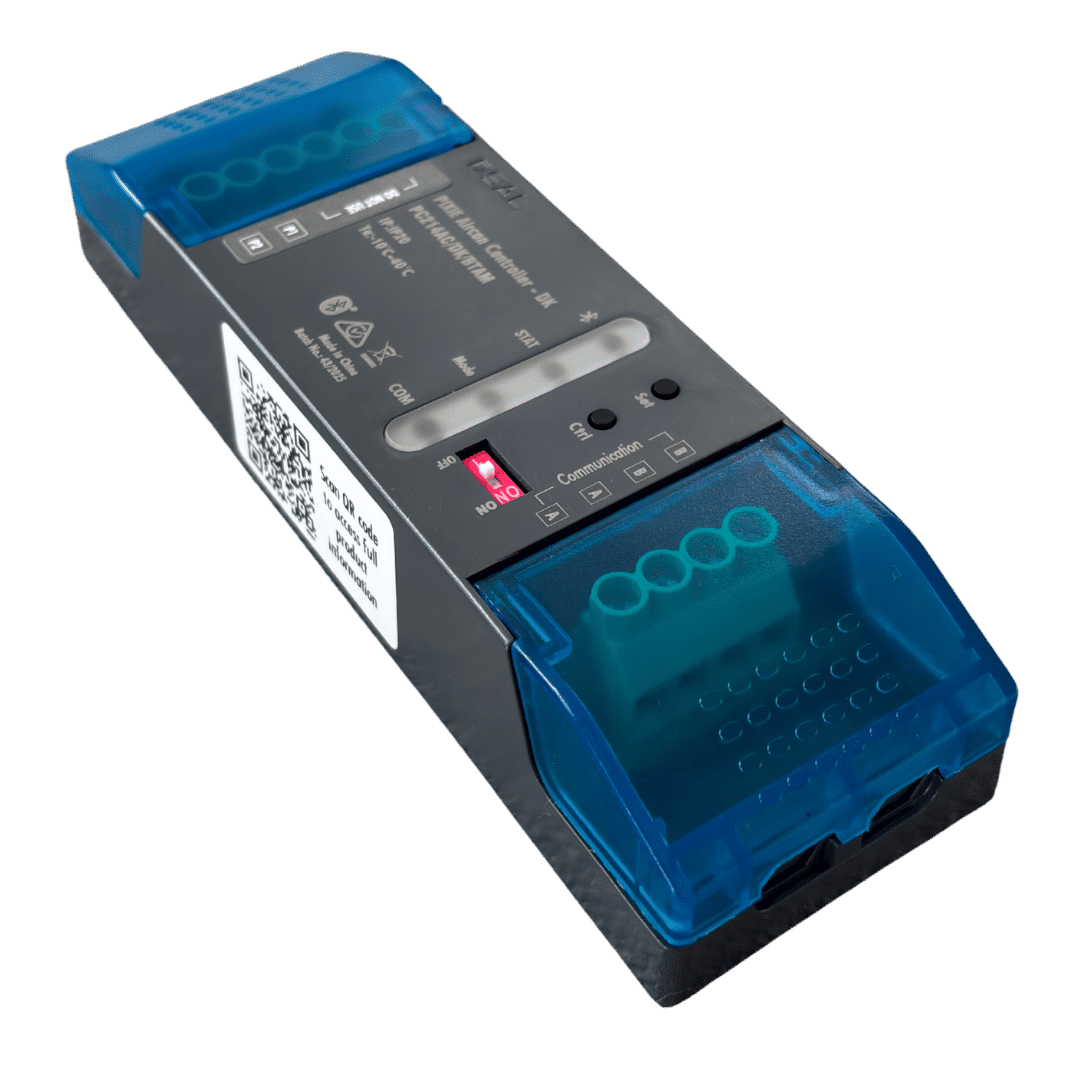
PIXIE Air Con Controller for DAIKIN™ (part#: PC214AC/DK/BTAM) #

The PAC is the simplest and most cost effective way to deploy smart home control of your Daikin™ Ducted Air Con system in Australia – old or new.

  • – Install the Device
  • – Scan the network for the newly added AC device with the PIXIE App
  • – Control is yours in less than a minute


This device can be installed as part of a larger PIXIE smart home installation or as a stand alone DAKIN™ Ducted Aircon system controller with free Mobile App control on iOS and Android mobile phones and tablets.

The PAC is PIXIE Bluetooth mesh enabled device, requires only a single 24V AC connection to the Daikin™ Indoor unit, and unlike DAIKIN™s own AirBase product, the PAC does not depend on WiFi or home network connectivity for in home operation.

If users would like remote access and control, adding the PIXIE Gateway (SGW3BTAM) delivers out of home control from anywhere and voice integration with Google Home, Amazon Alexa, SIRI Shortcuts and Samsung SmartThings.

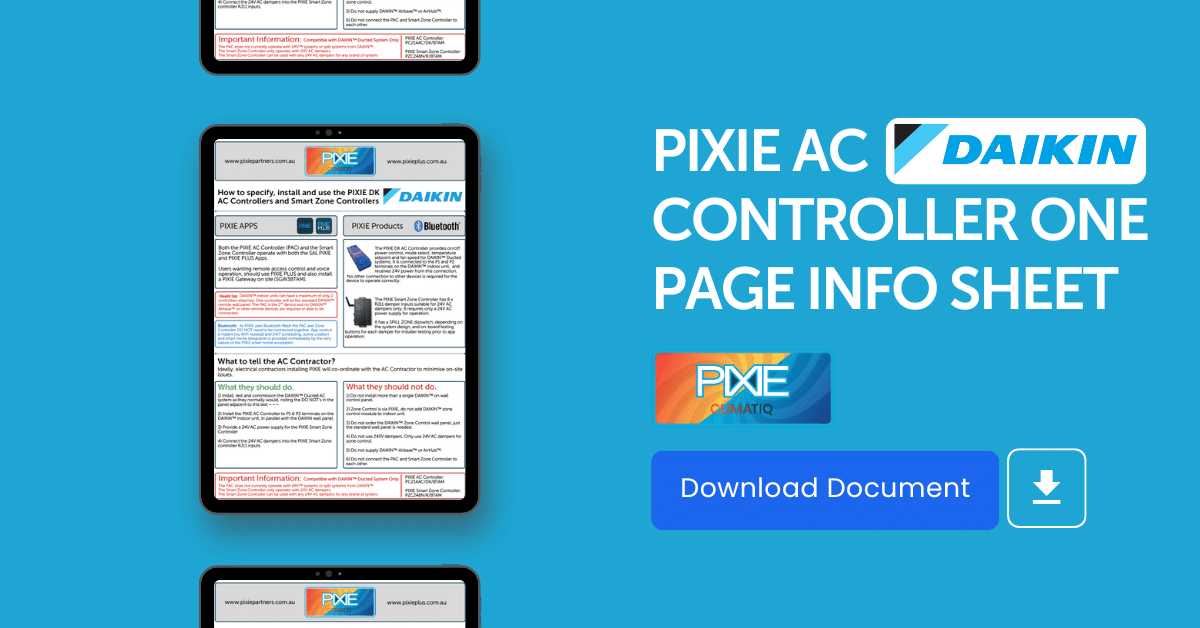
Download PIXIE CLIMATIQ DAIKIN One Pager

Download PIXIE CLIMATIQ DAIKIN One Pager


On Device Control #

The PIXIE Aircon Controller for DAIKIN™,  has 2 control buttons on the front of the module and LED indicators for installers to directly test operation and receive feedback of operational status without needing any other tools or apps.

  • 1) Button 1 operates the DAIKIN™ indoor unit On and Off
  • 2) Buttons 2 cycles through the operating modes – Cool, Heat, Fan , Dry


These buttons also provide access to core PIXIE features such as Wireless Pairing (to PIXIE Multifunction controllers) and Factory Reset as per all PIXIE device’s standard operating principles.

⚠️

Heads up!

DAIKIN™ Ducted Systems only allow a maximum of 2 controllers to be installed to a single indoor unit. A controller can be an on wall remote panel, a DAIKIN™ Air base or a PAC from PIXIE.

The recommended installation process is to have a single DAIKIN™ on-wall remote – the normal Daikin™ on wall remote panel – and the PAC installed in the ceiling space.

The PAC operates as one of these 2 allowed controllers.


However, remember, once the PIXIE PAC is added to the system, users have an array of different methods by which they now can control their DAIKIN™ Ducted Air con system, so this DAIKIN™ limitation is obviated by using PIXIE!


These additional aircon control methods include:

  • – PIXIE Apps – Mobile and tablets ( which can be wall mounted or mobile)
  • – PIXIE Touch Panel
  • – PIXIE Multifunction Controller
  • – PIXIE  HALO(Coming soon)


What’s the Outcome Achieved? #

With this installation of this simple PIXIE module you will instantly have control of the following from your PIXIE Apps, PIXIE Touch Panel, Voice Control (when enabled).

  • – Power On / Off DAIKIN™ Ducted aircon system
  • – Temperature Set point control
  • – Fan Speed control
  • – Mode selection – heat, cool, fan, dry
  • – Schedules


Additionally any and all of these functions can now be combined with the PIXIE smart home ecosystems of scenes, schedules, programs and more, for deep and sophisticated smart home integrated applications to maximise energy savings, comfort and convenience.


What About Zone Control? #

Zone control of DAIKIN™ ducted system is possible using the PIXIE CLIMATIQ products, however it is important to understand the different scenarios and best practice.


Scenario 1; Existing DAIKIN™ Zone Controller

Installation of the PAC with a DAIKIN™ system with an existing DAIKIN™ Zone controller installation is possible.

However, in this instance PIXIE will not be able to control the zoning, which would remain controllable from DAIKIN™ remote wall panel with zone control capabilities.

The PAC would provide all of the control already detailed above, excluding zone control.

If homeowners wanted PIXIE to also control their zones because of the extra capabilities this smart control can deliver, the existing DAIKIN™ Zone controller can be replaced with the PIXIE Zone Controller. However it may not be financially practical to do so, but that is a decision for each home to make.


Scenario 2: New DAIKIN™ Ducted Air Con with Zone Control Installation

When choosing to install a new DAIKIN™ Ducted Air Con Control with Zone control, users can simple inform their AC supplier that the AC controller and Zone Controller they are installing will be supplied by PIXIE.

This means a standard DAIKIN™ on wall remote panel is required, not the higher priced  zone control version, and the air con installer should deploy their installation in the normal manner, including zone control cabling, dampers, return air thermostats, system balancing and so on etc.

Instead of installing the DAIKIN™ Zone controller, they would instead install the PIXIE version.


💡

Link PIXIE Zone ControllersOnce the PIXIE Smart Zone Controllers have also been added it’s recommended to head back to the Aircon Controller in the PIXIE Apps and LINK your Zone controller. This enables you to be able to control both aircon variables and control zones from a single interface.


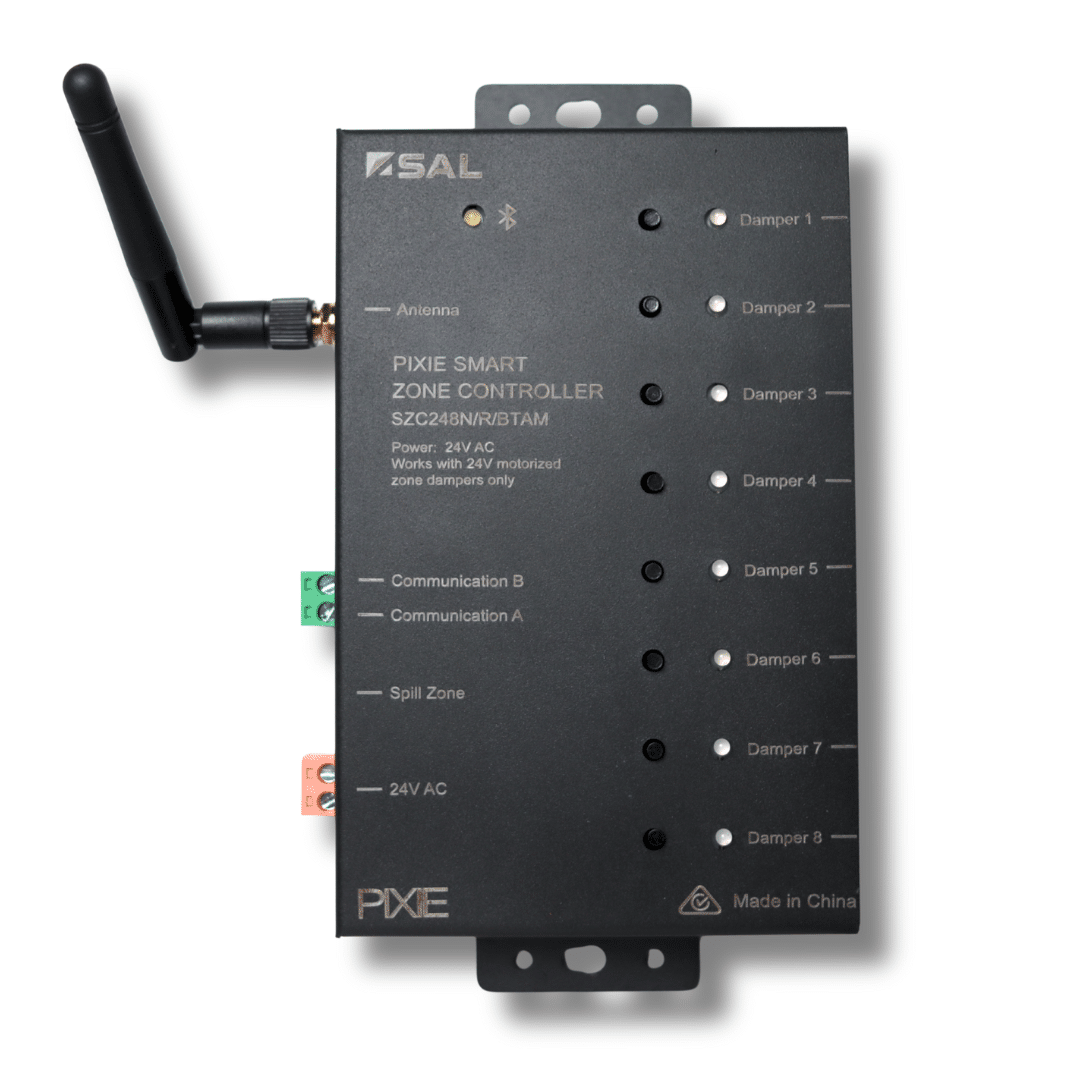
PIXIE Zone Controller – (part#: SCZ248N/R/BTAM) #

The PIXIE Zone Controller is an 8-channel Bluetooth® mesh 24V AC damper controller with spill-zone and on-device test buttons, delivering fast, smart zoning for ducted aircon systems in Australia by opening and closing 24V AC dampers to allow or stop airflow to each zone. It has a screw on antenna which must be connected to optimise Bluetooth mesh range control, as the housing of the device is a constructed of metal.


Download PIXIE Smart Zone Controller Datasheet

Download PIXIE Smart Zone Controller Datasheet

⚠️

Heads up!If you have or you are considering installing 240v dampers, the PIXIE Zone controller will not be compatible, they must be 24V AC dampers.


The PIXIE Zone Controller, is the simplest and most cost effective way to deploy smart zone control of your Daikin™ Ducted Air Con system in Australia – old or new.

  • – Install the Device
  • – Scan the network with the PIXIE App
  • – Control is yours in less than a minute


This device can be installed as part of a larger PIXIE smart home installation or as a stand alone addition to a DAKIN Ducted Aircon system with mobile App control on iOS and Android mobile phones and tablets.

The PIXIE Zone Controller is PIXIE Bluetooth mesh enabled device, requires only a single 24V AC connection to power the device (and wired connection to the 24V AC dampers in the ceiling space of course), does not depend on WiFi or home network connectivity for in home operation.

It should be installed in the ceiling space for convenient wiring connection to the 24V AC dampers but does NOT need to be physically connected to the PIXIE Air con Controller (PAC) as this communication is achieved wirelessly via the PIXIE Bluetooth mesh network.

The wireless interconnectivity simplifies installation, reduces wiring and labour costs and delivers a modern smart home approach to system installation.

If users would like remote access and control of aircon zones, adding the PIXIE Gateway (SGW3BTAM) delivers out of home control from anywhere and voice integration with Google Home, Amazon Alexa, SIR Shortcuts and Samsung Smartthings.


What’s the Outcome Achieved? #

With the installation of this simple PIXIE module you will instantly have control of the following from your PIXIE Apps, PIXIE Touch Panel, Voice Control (when enabled).

  • – Individual Control of up to 8 Zones
  • – Add another Zone controller and up to 16 Zones can be controlled, individually.


💡

Wireless WinsNote there is no requirement for the secondary zone controller to be wired or physically connected to the primary zone controller OR the PIXIE Aircon controller, making installation in multi level homes with aircon zone control far simpler and easier than existing solutions.

All that each PIXIE Zone Controller needs is a 24V AC supply and wired connection to the in-ceiling dampers to successfully provide wireless zone control functions.


Additionally, this zone control of up to 16 zones can be combined with the PIXIE smart home ecosystems of scenes, schedules, programs and more, for deep and sophisticated smart home integrated applications.

This of course includes combining AC Zone Control and AC temp set point, fan speed and modes simultaneously to fine tune how your AC works at different times of the day, week and month, automatically or ad-hoc as you please.

Its also possible using PIXIE smart home logic programming and event based triggers to control zones and other AC control functions. As these are native PIXIE devices users receive deep integration and sophisticated Air Con control.


Smart Zone Control Control methods include:

  • – PIXIE Apps – Mobile and tablets (which can be wall mounted or mobile)
  • – PIXIE Touch Panel
  • – PIXIE Multifunction Controller
  • – PIXIE HALO (Coming soon)


On Device Control #

The PIXIE Zone Controller for DAIKIN™ (the same device can be used for any 24V AC dampers for any AC system),  has 8 control buttons on the front of the module and LED indicators for each for installers to directly test operation and receive feedback of operational status of each damper, without needing any other tools or apps.

This is useful to test whilst in the ceiling space for time saving and oepration confirmation.

  • 1) Operate each button to test the operation of each connected damper – the LED turns RED when closed, green when open.
  • 2) Long press any button for 5 seconds to set that damper as the SPILL ZONE – when the spill zone witch is on. Channel 1 damper is default spill zone.
  • 3) Press and hold Buttons 1 and 2 for 5 seconds to identify the spill zone. The current spill zone will flash red and green for 10 seconds.
  • 4) Press any damper button 7 times quickly to disable that damper output. Also able to be done via the App.


These buttons also provide access to core PIXIE features such as Wireless Pairing (to PIXIE Multifunction controllers) and Factory Reset (any button) as per all PIXIE device’s standard operating principles.


Spill Zones #

A spill zone (also called a constant zone) is a deliberately designated ducted-air zone that always remains open, or automatically opens when other zones shut.

Its job is to provide the minimum airflow the indoor fan needs so it never “dead-heads.” This keeps static pressure within safe limits, reduces noise, prevents ductwork stress, and allows the inverter head to ramp smoothly.

In practice, the spill zone is usually a hallway or living area that stays on as the default air path. It must be sized to meet the manufacturer’s minimum air volume and always have a clear return-air path.

By giving the supply air somewhere to go when other zones close, the spill zone avoids the need for an energy-wasting bypass back into the return. The result is better efficiency, protection for the fan and coil, consistent comfort, and a simple, reliable way to use on/off dampers in zoning systems.

The Dip Switch #

The on board dip switch on the PIXIE Zone Controller, simply enables and disables this functionality because in some system design the air con designers and suppliers may actually design one of the air paths with no damper, so it is the default spill zone by hardware design, meaning the PIXIE Zone controller does not need to manage this.

When activated (factory default), Channel #1 is is by default nominated as the spill zone, meaning if you issue a command to close all dampers, the damper nominated as a spill zone will not close or if already closed and all other active dampers are to be closed, will open to ensure safe system operation.

This spill zone channel can be nominated via the PIXIE apps or using the on board control buttons.


Can the PIXIE Zone Controller Operate on any other Systems? #

As the PIXIE Zone Controller interfaces with standard 24V AC dampers, any other air-conditioning system which has zoning can also introduce wireless zone control.

This is likely to be most useful when homeowners have a manual or stand alone zone control wall panel in their home and would like greater flexibility as to how those zones are used to maximise comfort and energy savings.

Typically these simple zone control wall panels will have all of the zone damper cabling running into the back of them and the distributed up the wall and out to the various dampers in the ceiling space for manual open and close control – a.k.a AC zoning control.

By installing the PIXIE Zone controller in the ceiling and connecting the end points into the PIXIE Zone Controller instead of the on-wall panel, wireless app control is provided as well as access to schedules, scenes and other smart home functions, if more PIXIE equipment is present or added into the home.

If users want to maintain a panel on the wall where the old zone panel was installed, the PIXIE Multifunction Controllers, can be wirelessly paired to individual zone channels on the PIXIE Zone Controller too.

Alternatively the PIXIE HALO could be mounted at this location and serve as a modern interface for zone control, and also deliver great system wide smart home control when more PIXIE equipment is installed also.


PIXIE HALO Room Controller #

This device will be released in 2026. More to follow…


PIXIE CLIMATIQ Scenarios #

After installation of the PAC or PZC, or both, a range of smart home control scenarios are available to home owners quickly and easily.

🌟

Sophisticated, Integrated, Smart Home ControlThese can be treated as stand-alone AC related control and / or these can be deeply integrated with other scenarios within the PIXIE ecosystem, depending on the extent of PIXIE smart home products and control on site.

However, even if a home owner only has AC related control via PIXIE all PIXIE schedules and scenes can be delivered via the PIXIE Apps, and a range of on wall control options native to the PIXIE Smart Home System


1) AC Control App Only #

As the PAC is a native PIXIE device home owners can access control capabilities of their ducted system from the PIXIE Apps.

This includes temperature set point, fan speed, operating mode and power.

Each of these elements can then be scheduled, included in scenes – and with the addition of the PIXIE Gateway controlled remotely, voice controlled and included in sophisticated control logic scenarios using PIXIE’s PROGRAMode functionality.


2) AC Control with PIXIE On Wall Control #

If on wall control is required PIXIE offers a range of additional methods.

Remember there will one main DAIKIN control panel on the wall somewhere also, this is still required.

PIXIE provides user interfaces ranging from a simple multifunction button for power on and off, right through to PIXIE Touch Panel control, Mobile tablet of your choice control and the PIXIE HALO for a modern smart home interface to AC and other PIXIE smart home functions.


3) Just Zone Control with Multifunction Controllers Only #

When the PIXIE Zone controller is installed, irrespective of whether the PAC is also installed, PIXIE can pair each of the individual zones to a Multifunction Controllers for a more traditional and simple zone control wall plate. That is, a button or buttons on the wall.

💡

Simple, Wireless Wall Panel InstallationAs PIXIE Multifunction Controllers can be paired wirelessly to the PIXIE Zone controller and have LED indicators which track the state of the device to which they are paired, users can determine easily which zones are on and off, without having to run cabling between the Zone Controller and the wall plate.

This is one of the key advantages of using PIXIE, simplicity and time saving. These zone cables are centralised back to the in-ceiling zone controller and the the PIXIE Multifunction’s are paired wirelessly to each of the 8 Zone Controller channels as needed.

All the single, or group, of PIXIE Multifunction controllers require is Hard Active and Neutral from any power or light circuit and these are then wirelessly paired to each damper control channel.

These can be individually wirelessly paired  – One Multifunction control to one damper channel  either via the app and by using the standard PIXIE pairing method-

As the LED indicator on the PIXIE Multifunction controller tracks the state of the open or closed state of the damper, users get a useful on wall display cheaply.


4) Just Zone Control with App or Touch Panel Only #

If home owners are seeking to remove wall clutter, the zones are controllable directly via the App with direct control, scenes (affect multiple dampers in open or closed position form a single press) and schedules (or scheduled Scenes!)

If a centralised wall control is more desirable, the PIXIE Touch Panel can be installed. This device controls all of PIXIE smart home devices, groups, scenes and of course AC Zone control. As the PIXIE gateway is needed for a touch panel, users are able to access voice control of their AC zones as well.

The PIXIE Touch Panel also control ceiling fans, and interfaces with Intercom systems with 2 way voice and one way video, making the touch panel the single user interface needed for AC control, intercom, fan control, lighting and removing a wall full of difference screens in favour of a simple single Touch Panel interface for whole home control.


5) Zone Control with Individual Room Control and App and Touch Panel Control #

This is achieved simply by installing both devices – the PAC and the PZC – AC control and Zone control in one.

The user interface on both the App and the Touch Panel are similar and familiar in their simplicity and using PIXIE’s Bluetooth mesh, you can control these functions from anywhere. The PIXIE Touch Panel provides up to 8 permanent on-wall location from where to control AC and Zones in the home.


6) Zone Control with In-Room Control, Individual Room Control and App and Touch Panel Control #

An extension of #5 above is the ultimate deployment with PIXIE.

Its add the PIXIE HALO Room control device in every room, as well as featuring PIXIE Touch Panels in main areas for whole home control including AC and Zones.

As the PIXIE HALO will be released in 2026 further details of precise control cannot yet be shared.

However each room will have control of AC and any other PIXIE devices in the room ( or home ) via a beautifully design interface with full colour touch panel, with mechanical wheel for easy operation of AC temperature/fan speed/ mode operation, lighting, ceiling fans and more; with a simple installation method and low cost versus value proposition.


Some Air Con Industry Definitions #

You can skip this section if you understand aircon terminology.


Ducted Air Con:

A centralised air conditioning system that cools or heats the entire home via a network of ducts. It has one outdoor compressor unit and a large indoor fan-coil unit (usually hidden in the ceiling or under the floor), distributing conditioned air through vents in each room.

In Australian homes, ducted systems are typically reverse-cycle (providing both cooling and heating) and require sufficient roof or underfloor space for installation.

  1. – Whole-home climate solution with one integrated system conditioning multiple rooms (often via a single concealed indoor unit).
  2. – Unobtrusive appearance as the indoor equipment is hidden and only small ceiling diffusers are visible, preserving home aesthetics.
  3. – Can be divided into zones for flexible control so you can adjust or switch off airflow to specific areas, improving comfort and saving energy by only cooling/heating occupied spaces.


Air Con Controller:

The device or interface used to operate an air conditioning system, setting the temperature, mode (cool/heat), fan speed, timers, etc.

In Australian homes this may be a handheld remote (commonly infra-red) for split-system units, or a central wall-mounted panel for ducted systems. Modern controllers often include digital displays allowing scheduling and remote access for convenience.

  1. – Provides an easy, consolidated way to control your climate system: all settings (on/off, temperature, fan, mode) can be managed in one place.
  2. – Many controllers are programmable, allowing scheduling to save energy (for example, auto-off at night).
  3. – No multi-brand standardisation as controllers are usually specific to the unit/brand, so replacements or upgrades must be compatible. This can limit swapping controllers between systems.
  4. – Wall panels are fixed but may require going to that location to adjust.) Ensuring correct installation and possibly multiple controllers/sensors in larger homes is necessary for even performance.


Remote Wall Panel:

A fixed wall-mounted control panel for an HVAC system.

In residential ducted air conditioning, this is the primary user interface, typically a wired digital thermostat/control unit mounted on an interior wall. It allows the homeowner to turn the system on/off, select modes, set the desired temperature, and often control zones and fan settings.

Australian ducted systems include a wall controller (e.g. the Daikin “Nav Ease” panel for basic control) as standard.

Wall controllers are provided by all major HVAC manufacturers for their ducted systems, and must be installed according to wiring rules (typically extra-low-voltage connections). There isn’t a specific Australian standard just for wall panels, but they form part of the system’s compliance.

In Australia, it’s common to have one central wall control in the main living area; in larger homes, multiple panels can be installed for convenience (e.g. one on each floor). All ducted units from brands like Daikin, Mitsubishi, Actron, etc., come with a proprietary wall controller.

  1. – Permanent and easy to use: a wall panel is fixed in a known location, powered from the system, no batteries or lost remotes to worry about. Anyone in the home can walk up and adjust the climate settings.
  2. – Provides full-featured control with clear display of temperature and settings. Many include advanced functions (timers, scheduling, filter-clean reminders) and can integrate zone control, allowing you to open/close zones at the touch of a button.


Zone Controller:

A control system that divides a ducted air conditioning setup into multiple zones and regulates airflow or temperature for each zone independently.

In Aussie homes, this typically means a central zone controller unit or module operates motorized dampers in the ductwork to open/close airflow to different rooms (zones). The user can choose which zones receive conditioned air – for example, bedrooms vs living areas – rather than conditioning the whole house at once.

Basic zone controllers simply turn zones on or off (all zones share the main thermostat setting), while advanced systems use individual zone thermostats/sensors so each zone can maintain a different temperature setting.

Energy savings: Only conditioning the areas you need can significantly cut running costs. Zoning “allows you to target… specific rooms you want to heat or cool… rather than running your entire system throughout the home,” thereby avoiding wasted energy on empty rooms.

This often means you can run the AC more efficiently or for shorter periods in unused parts of the house.

Improved comfort and flexibility: Each zone can be controlled to suit different preferences or uses – e.g. keep bedrooms cooler at night while living areas are off, or vice versa. Family members in different rooms can have personalized comfort since zones can have separate controls/thermostats.

Capacity optimisation: Because not all zones need to be on at once, a smaller overall system might suffice for the house, saving upfront cost or reducing strain. Manufacturers note that zoning can even allow use of a smaller AC unit than otherwise needed, since you’re not always cooling the whole house simultaneously.


Damper:

In HVAC, a damper is a movable plate or valve within a duct that regulates airflow.

In Australian residential AC, motorised dampers are installed in ductwork to enable zoning, they open or close to direct air to particular zones or rooms. For example, when a zone is turned off, its damper closes to stop airflow to that area.

Dampers can also be manual (set in a fixed position to balance airflow) or automatic. Aside from zoning use, special fire dampers are used in some constructions to prevent fire spread through ducts, but in single-family homes the term usually refers to the zoning dampers.

In practice, motorised zone dampers are widely available in Australia through HVAC suppliers and manufacturers – e.g. Daikin sells 24V and 240V motorized dampers in various sizes to suit common duct diameters.

They are a standard accessory in ducted installations with zoning.

Enables zoning: Dampers are the key hardware that makes independent zone control possible – by shutting off airflow to certain ducts, they allow one AC system to serve multiple areas selectively. This contributes to energy efficiency and custom comfort (only rooms with open dampers receive air).

Simple, proven technology: A damper is a straightforward mechanical device (often just a pivoting metal blade inside the duct). Motorised versions reliably respond to zone controller signals. They come in standard sizes to fit standard ducts and are made of durable materials (galvanized steel etc.). In short, they’re a well-established solution with many compatible options on the market.

Helps balance airflow: By adjusting dampers (or using partially-open settings in advanced systems), airflow can be fine-tuned. For instance, if one room is getting too much air, a damper can be throttled to distribute more air to other rooms, smoothing out temperature differences. This can improve overall comfort in a home.


VRV (Variable Refrigerant Volume) / VRF (Variable Refrigerant Flow):

An advanced multi-split air conditioning system originally pioneered by Daikin (who use the term VRV).

It connects multiple indoor units to one outdoor condensing unit, circulating refrigerant variably to each indoor unit so that output can be adjusted to the demand in each zone. In residential use, a VRV system lets you have individual air conditioning units in different rooms (e.g. a mix of wall-mounted, ducted or cassette indoor units) all run off a single outdoor compressor unit, with the system modulating refrigerant flow to meet each room’s needs.

This provides individual zone control similar to having multiple split systems, but with a single (often large) outdoor unit handling the combined load. VRV/VRF systems are essentially scaled-down commercial HVAC technology; they are most often found in large homes, luxury residences or apartment complexes in Australia, rather than standard detached houses.

High initial cost and Complex installation and maintenance: VRV/VRF systems are substantially more expensive to install than standard split or ducted systems. The equipment and the required expertise for design/installation come at a premium, so they tend to be viable mainly in larger luxury homes or multi-unit developments where the investment can be justified. For a typical Australian household, the cost factor alone often makes VRF uneconomical compared to simpler solutions.


air-con, DAIKIN
Rate your level of satisfaction with this answer

Share This Article :

  • Facebook
  • LinkedIn
Still stuck? How can we help?

How can we help?

Updated on December 16, 2025
How to use and Set Up PIXIE Portal – Long Distance BT Mesh Booster System
Subscribe
Login
Notify of
guest
guest
0 Comments
Oldest
Newest Most Voted
Inline Feedbacks
View all comments
Table of Contents
  • What DAIKIN™ Aircon is PIXIE Compatible With?
    • What about DAIKIN VRV Systems?
  • PIXIE or PIXIE PLUS?
    • PIXIE Air Con Controller for DAIKIN™ (part#: PC214AC/DK/BTAM)
      • On Device Control
      • What's the Outcome Achieved?
      • What About Zone Control?
    • PIXIE Zone Controller - (part#: SCZ248N/R/BTAM)
      • What's the Outcome Achieved?
      • On Device Control
      • Spill Zones
      • The Dip Switch
      • Can the PIXIE Zone Controller Operate on any other Systems?
    • PIXIE HALO Room Controller
  • PIXIE CLIMATIQ Scenarios
    • 1) AC Control App Only
    • 2) AC Control with PIXIE On Wall Control
    • 3) Just Zone Control with Multifunction Controllers Only
    • 4) Just Zone Control with App or Touch Panel Only
    • 5) Zone Control with Individual Room Control and App and Touch Panel Control
    • 6) Zone Control with In-Room Control, Individual Room Control and App and Touch Panel Control
  • Some Air Con Industry Definitions
  • Follow
  • Follow
  • Follow
PIXIE-PLUS-smart-home-logo

Privacy Policy

Terms and Conditions

Proof of Purchase

Copyright 2020, 2021, SAL National Pty Ltd ABN: 21 633 189 474

Toll Free Support Line:

1800 256 843

HOMEPAGE

〉Free Training Course

PIXIE Partners Account

PIXIE Points Explained

PIXIE App Downloads

PIXIE Consumer Website

SAL National HQ Website

PIXIE PRODUCTS

All PIXIE G3 Products

PIXIE Master Devices

PIXIE Secondary Devices

PIXIE Dimmers

PIXIE Switches

PIXIE Power Control

PIXIE LED Strip & Control

PIXIE Bluetooth Boosters

PIXIE Integration Devices


TECH & SUPPORT


〉FAQ & Support

〉Free Design Service

Tech Docs Downloads

Australian Smart Home Blog

Consumer Brochure

Technical Description

Technical Overview

Connected Home Idea

DOWNLOAD PIXIE


Visit the store of your choice to download the PIXIE PLUS App.

This site is protected by reCAPTCHA and the Google
Privacy Policy and
Terms of Service apply.

The Bluetooth® word mark and logos are registered trademarks owned by Bluetooth SIG, Inc. and any use of such marks by SAL National Pty Ltd is under license. Google Play and the Google Play logo are trademarks of Google Inc. Apple, the Apple logo, Apple Watch and iPhone are trademarks of Apple Inc., registered in the U.S. and other countries. App Store is a service mark of Apple Inc., registered in the U.S. and other countries. © Copyright 20202 SAL National Pty Ltd. All rights reserved. Other trademarks and trade names are those of their respective owners.

wpDiscuz