

PIXIE works with DALI and DALI-2. #
The PIXIE Smart DALI Broadcast Controller brings DALI-2 certified dimming into the PIXIE system without the commissioning complexity, specialist labour, or cost premium of traditional DALI systems. One device. Full PIXIE G3 functionality. No DALI programming required.
Primarily written for electricians, PIXIE Partners, and PIXIE Certified Installers specifying or installing DALI-2 lighting control. Lighting designers, architects and specifiers will also find the standard overview and wiring comparison sections useful when evaluating whether PIXIE is the right fit for a DALI project.
DALI-2 certified, without the traditional DALI overhead. #
PIXIE works with DALI and DALI-2 lighting drivers using the PIXIE Smart DALI Broadcast Controller PC155DLB/R/BTAM. It is an official DALI-2 certified device, compliant with the Australian Standard for lighting control (IEC 62386), and it integrates fully into the PIXIE Bluetooth mesh smart home system.
The key difference from a traditional DALI installation: the controller uses DALI BROADCAST mode. This means all DALI drivers connected to a single PIXIE DALI controller operate as one synchronised group, wired just like a normal PIXIE switchwire circuit. No DALI programming software. No specialist commissioning agent. No additional DALI power supply.
DALI capability, at PIXIE simplicity and cost. #
For the first time, electricians can deliver a genuine DALI-2 controlled lighting system at the speed and cost of a standard smart home installation. The PIXIE Broadcast approach preserves all the performance and fixture-choice advantages of the DALI-2 standard while eliminating the overhead that has historically made DALI unviable for most residential and mid-tier commercial jobs.
- No DALI programming needed, ever
- No separate DALI power supply required, it is built in
- Wired the same way as all other PIXIE devices
- Faulty driver replacement requires no re-commissioning
- Full PIXIE G3 functionality: schedules, groups, scenes, voice, PROGRAMode
What is DALI-2? #
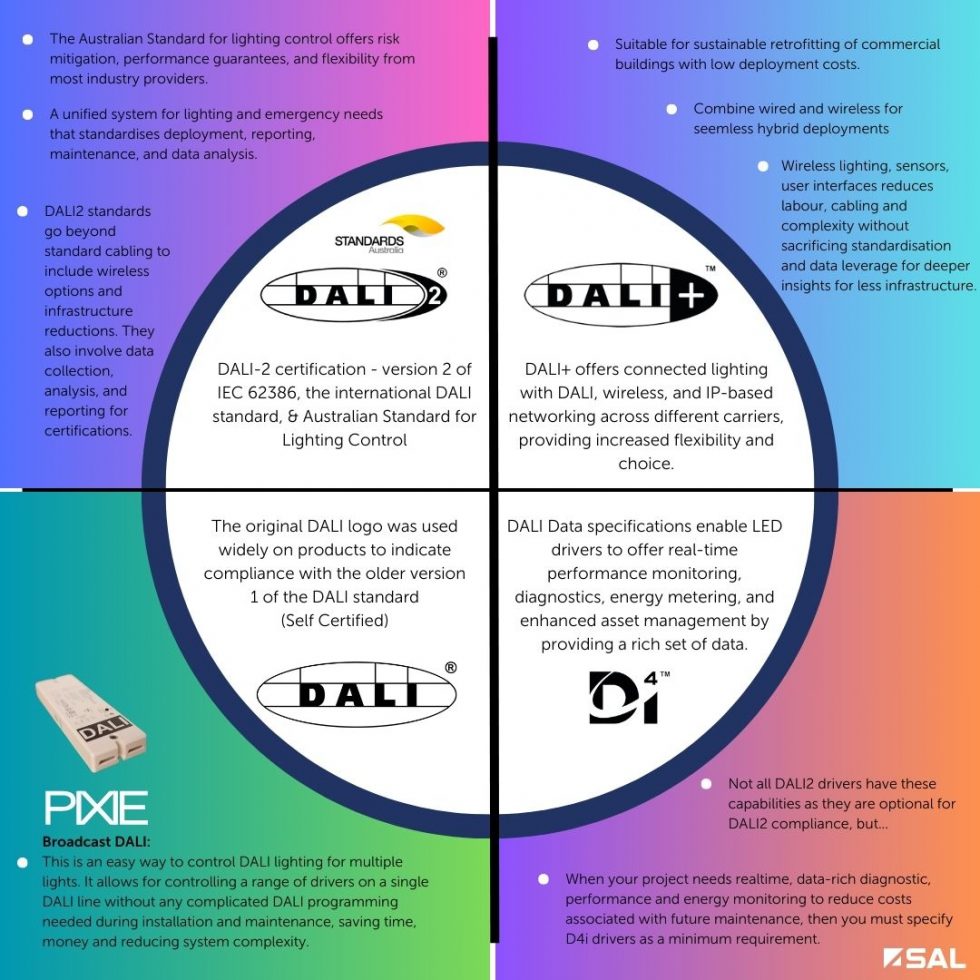
DALI-2 is the Australian Standard and international standard (IEC 62386) for lighting control. It offers risk mitigation, performance guarantees, and the flexibility to specify fixtures from virtually any lighting manufacturer with confidence in how they will perform.
When a project uses DALI-2 certified drivers, the specifier gets a defined, consistent dimming curve and control behaviour as set out in the standard. Critically, any certified DALI-2 driver from one manufacturer will perform consistently alongside a certified DALI-2 driver from any other manufacturer.
Performance guarantee #
DALI-2 certification means the fixture and driver will perform to a known standard. Specifiers can be confident of the outcome based on the technology, not just the installer's skill or the specific product configuration.
Fixture freedom #
DALI-2 opens access to a vast range of architectural and commercial lighting fixtures that are only available with DALI drivers. Previously, using these fixtures in a PIXIE system was not straightforward. Now it is.
Cross-brand compatibility #
Any certified DALI-2 driver from any manufacturer works with any other DALI-2 certified controller. The standard eliminates the proprietary lock-in that characterised earlier generations of lighting control systems.
In high-end residential, hospitality, commercial and healthcare applications where architects or lighting designers nominate specific fixtures that require DALI drivers. Also used in projects requiring consistent performance reporting, energy metering, or asset management data from luminaires. Without the PIXIE DALI Broadcast Controller, these projects would have required a separate, more expensive legacy control system running alongside PIXIE.
When should I specify DALI instead of other dimming options? #
PIXIE supports all major dimming technologies. For most residential and standard commercial jobs, PIXIE phase dimmers, 0-10V controllers, and PWM LED strip controllers are the practical first choice. DALI becomes the right specification when the project has requirements that only DALI delivers.
Specified DALI-2 fixtures #
In high-end residential, hospitality, retail and healthcare projects, lighting designers and architects regularly nominate specific fixtures that only come with DALI-2 drivers. The PIXIE DALI Broadcast Controller allows those fixtures to be part of a PIXIE smart home system without requiring a separate legacy control platform alongside it.
Performance and certification #
Projects requiring documented, standardised dimming performance benefit from DALI-2 certification. The standard defines the exact dimming curve and behaviour, so the specifier can guarantee to the client what the system will deliver, independent of who installed it or which brands are mixed.
Commercial retrofit #
Existing commercial buildings with DALI fixtures already installed can be retrofitted into the PIXIE system using the Broadcast Controller. The DALI-2 certification also makes the controller suitable for projects that need to meet building compliance or sustainability criteria tied to the lighting standard.
Mixed dimming technology jobs #
PIXIE can mix DALI-2 controllers with phase dimmers, 0-10V controllers, and LED strip controllers in the same system, within the same groups and scenes. A DALI-2 architectural pendant in the kitchen can dim in the same scene as standard PIXIE phase-dimmed downlights in the adjoining hallway.
With the addition of the DALI-2 Broadcast Controller, PIXIE supports DALI-2, phase dimming, 0-10V, and PWM for LED strip dimming. A single PIXIE installation can control fixtures using different dimming technologies from within the same app, the same groups, and the same scenes.
PIXIE Smart DALI Broadcast Controller. PC155DLB/R/BTAM. #
A DALI-2 certified master device with full PIXIE G3 functionality built in. Install it like any other PIXIE device, scan it in the app, and control it alongside every other light, fan, blind, and sensor on the job.
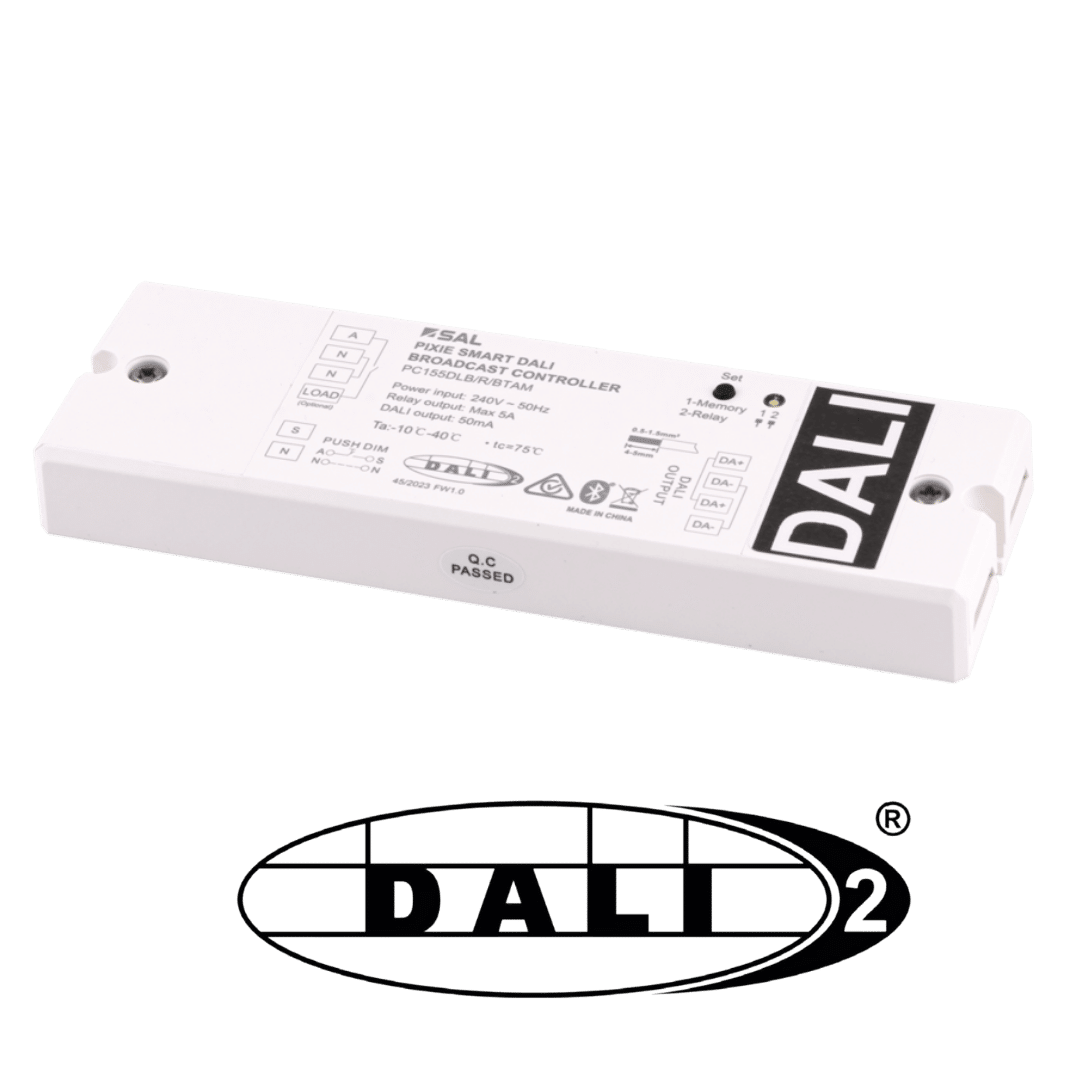
PIXIE Smart DALI Broadcast Controller #
| DALI certification | Official DALI-2 certified (IEC 62386, Australian Standard) |
| DALI mode | Broadcast (all connected drivers operate synchronously) |
| Power input | 240V AC, 50Hz |
| Relay output | Max 5A (built in, no minimum load) |
| DALI output | 50mA built-in DALI power supply (no external supply needed) |
| Operating temperature | -10°C to 40°C ambient |
| Network | PIXIE Bluetooth mesh (built-in Booster circuit) |
| PIXIE generation | G3 Master Device: dimming, groups, scenes, schedules, PROGRAMode |
| Push-DIM input | BP input for momentary press mechs and 3rd-party systems |
| Memory function | Returns to previous level after power interruption |
| App control | SAL PIXIE or PIXIE PLUS (free, iOS and Android) |
| Voice control | Google Home, Amazon Alexa, Siri Shortcuts (with PIXIE Gateway) |
| On-wall dim control | PIXIE Multifunction Controller range (wireless) |
What is built in #
Official DALI-2 certification #
Certified to IEC 62386, the Australian and international standard for lighting control. Compatible with any DALI-2 certified driver from any manufacturer.
Built-in DALI power supply: 50mA #
No separate DALI power supply required on the job. The 50mA supply is built into the controller, keeping cost down and wiring simple.
5A relay, no minimum load #
Built-in 5A relay with no minimum load requirement. Suitable for switching loads where standard dimmers impose a minimum.
Memory Switch #
Returns to the previous dim level after a power interruption. Ideal for commercial, hospitality and healthcare applications where consistent behaviour after a power event is expected.
Built-in Bluetooth mesh Booster #
The Booster circuit extends the range and reliability of the PIXIE Bluetooth mesh network on site, the same as a standalone PIXIE Booster device.
Push-DIM (BP) input #
Accepts momentary press mechanical switches for direct on-wall dimming control, as well as inputs from 3rd-party systems, without requiring a separate PIXIE Multifunction Controller.
Broadcast DALI versus traditional DALI. How they differ on the job. #
How traditional DALI is wired #
In a traditional DALI installation, a single DALI twin control cable is run from the central DALI controller (located near the main board) to every DALI driver on site, in a daisy-chain or star topology, up to a maximum of 64 devices over a 300-metre run. This is in addition to the standard mains cabling that powers each driver.
Once wired, a trained commissioning agent connects a computer, runs specialist DALI programming software, and "soft-patches" the system: assigning each DALI device an address, grouping them into rooms, and defining how each responds to each control signal. The rooms and groups exist only in the software configuration, not in the physical wiring.
If a driver fails and is replaced, the new device typically needs to be re-addressed and re-programmed into the system. This is where time and cost compound on traditional DALI jobs.
The complexity and cost of a traditional DALI system comes almost entirely from the commissioning phase: the specialist agent, the programming software, the time on site. This is also the source of ongoing cost when drivers are replaced or the system is modified. The PIXIE Broadcast approach eliminates all of this.
How PIXIE Broadcast DALI is wired #
The PIXIE DALI Broadcast Controller works the way electricians already work. Instead of running a central DALI line to every driver on site, the electrician installs the lights on a switchwire circuit exactly as they normally would, then runs the DALI twin cable between only the lights on that circuit.
The PIXIE DALI controller is then wired at the switchwire-group level, not the whole-site level. Each switchwire group of DALI lights gets its own PIXIE DALI controller. All drivers on that switchwire operate synchronously via DALI Broadcast from that one controller.
| Aspect | Traditional DALI | PIXIE Broadcast DALI |
|---|---|---|
| Wiring topology | Single DALI line to every driver on site from a central controller | DALI twin runs between only the drivers on a single switchwire group |
| DALI power supply | Separate DALI power supply required at the central location | Built in to the PIXIE DALI controller, no additional device needed |
| Commissioning | Specialist commissioning agent + programming software required | No DALI programming, ever. Scan in the PIXIE app like any other device |
| Grouping method | Software-defined groups (soft patching); not in the wiring | Physical switchwire grouping, same as standard electrical practice |
| Driver replacement | Replacement driver must be re-addressed and re-programmed | Replace the driver and reconnect, no re-commissioning required |
| Independent fixture control | Yes, each DALI address can be controlled individually | All drivers on one Broadcast controller operate synchronously. For independent control, use one PIXIE DALI controller per fixture (see FAQ below) |
DALI twin runs between lights on the same switchwire. #
The DALI twin connects the drivers on a single circuit. The PIXIE DALI controller sits at the switchwire level and broadcasts to all drivers on that circuit simultaneously. There is no central DALI line to a main board location.
DALI has mains potential on the bus. The DALI twin cable used must therefore be double insulated to comply with Australian wiring standards. Figure-8 cable and CAT5/6 cable are not acceptable for use as a DALI communications bus. SAL recommends 1.5mm twin, double insulated cable for all DALI runs.
How to control a PIXIE DALI-2 installation. #
Once installed, the PIXIE Smart DALI Broadcast Controller scans and appears in the PIXIE app exactly like a standard PIXIE dimmer. Nothing about how it is found or configured in the app is different. From that point, all of the following control options are available.
PIXIE app and PIXIE PLUS app #
Full dimming control, scene activation, schedule management, and device settings from the SAL PIXIE or PIXIE PLUS app on iOS and Android. No difference in the app experience compared to any other PIXIE dimmer.
Groups: mix DALI with other dimmers #
DALI-controlled fixtures can be grouped with non-DALI PIXIE dimmers, such as phase dimmers, LED strip controllers, and 0-10V controllers. All grouped devices dim together as one unit, even though they use different underlying dimming protocols.
Scenes #
DALI devices can be included in scenes alongside any other PIXIE device in the home. For example, a "Welcome Home" scene can simultaneously set DALI architectural pendants to 60%, phase-dimmed downlights to 80%, and activate a fan, from a single trigger.
Schedules #
24-hour, 7-day schedules control DALI devices automatically, including sunrise and sunset scheduling when the PIXIE Gateway is installed. Schedules work locally on the device without requiring internet connectivity.
Voice control (with PIXIE Gateway) #
Once the PIXIE Gateway SGW3BTAM is installed and a voice assistant is linked, DALI-controlled fixtures respond to Google Home, Amazon Alexa, and Siri Shortcuts commands. Control a single DALI dimmer, a group containing DALI devices, or a scene that includes DALI devices.
On-wall: PIXIE Multifunction Controller (MFC) #
Wireless PIXIE Multifunction Controllers paired to the DALI Broadcast Controller give clients a physical button or rotary dial on the wall for direct dimming control, without any wired connection between the MFC and the DALI controller. The BP input on the device also accepts momentary press mechs directly.
Common questions about PIXIE and DALI. #
Can I control each DALI driver independently? ▾
In Broadcast mode, all DALI drivers connected to a single PIXIE DALI Broadcast Controller operate synchronously. They all dim to the same level and respond to the same commands simultaneously. They cannot be addressed and controlled individually from the same controller.
If you need independent control of a specific fixture, that fixture requires its own dedicated PIXIE DALI Broadcast Controller. Once it has its own controller, it becomes an independently addressable device in the PIXIE system, and it can also be added to groups and scenes so it works in conjunction with other light sources when required.
Does it work with original DALI (version 1) as well as DALI-2? ▾
Yes. The PIXIE Smart DALI Broadcast Controller is DALI-2 certified and is backwards compatible with DALI (version 1) drivers. Drivers bearing the original DALI logo (self-certified, version 1) will work with the PIXIE Broadcast Controller.
What cable do I use for the DALI twin? ▾
The DALI bus carries mains potential, so 1.5mm twin double insulated cable is required. Figure-8 and CAT5/6 are not acceptable under Australian wiring standards. See the wiring section above for the full requirement.
Do I need a separate DALI power supply? ▾
No. The PIXIE Smart DALI Broadcast Controller has a 50mA DALI power supply built in. A separate external DALI power supply is not required. This is one of the key cost and simplicity advantages over traditional DALI installations, where a separate DALI power supply is a standard additional component.
What happens if a DALI driver fails and needs replacing? ▾
In a traditional DALI system, replacing a driver typically requires a commissioning agent to re-address the new device in the programming software. With the PIXIE Broadcast approach, the new driver simply connects to the existing DALI twin cable and operates synchronously with the other drivers on that circuit. No re-commissioning, no programming, no specialist agent required.
Does the PIXIE Gateway need to be installed for DALI control to work? ▾
No. The PIXIE DALI Broadcast Controller operates locally via Bluetooth mesh without any internet connection or Gateway. In-home app control, on-wall MFC dimming, scenes, and schedules all work without the Gateway.
The PIXIE Gateway SGW3BTAM is only required for remote access (control from outside the home), voice control assistants (Google Home, Alexa, Siri), and PROGRAMode automation rules.
Can DALI drivers be grouped with non-DALI PIXIE dimmers? ▾
Yes. DALI-controlled fixtures can be grouped with any other PIXIE dimmer type: phase dimmers, LED strip controllers (PWM), and 0-10V controllers. All devices in a group dim together as one unit from a single control command, even though the underlying dimming protocol for each device differs. The app abstracts the control protocol entirely.
How many DALI drivers can I connect to one PIXIE DALI Broadcast Controller? ▾
The built-in 50mA DALI supply supports up to approximately 25-32 DALI drivers on a single controller, depending on the current draw of each driver (DALI specifies a maximum of 2mA per driver on the bus). The DALI standard allows up to 64 devices per line, but the practical ceiling with a 50mA supply is lower than 64. For larger circuits, add additional PIXIE DALI controllers, one per switchwire group.
For exact per-driver current draw, refer to the driver manufacturer's DALI data sheet.
DALI-2 capability. PIXIE simplicity. #
The PIXIE Smart DALI Broadcast Controller makes it practical to specify and install DALI-2 on any job where it is called for, without the overhead that has historically pushed DALI out of reach on residential and mid-tier commercial projects.