

Your smoke alarm just texted you. From anywhere in the world. #
Yes, PIXIE works with smoke detectors. Connect any smoke alarm with a dry contact (volt-free) output to the PIXIE Transceiver, add a PIXIE Gateway, and receive a custom push notification the instant the alarm activates. Trigger lights to full brightness automatically. Review a 7-day history. Arm and disarm on a schedule. This is the complete setup and control guide.
Electricians and PIXIE Certified Installers specifying smoke detector integration on a job. Homeowners setting up the system themselves. The setup walk-through screenshots are the homeowner's view in the PIXIE PLUS app, but the wiring, prerequisites and product selection sections are for the trade.
How smoke detector integration works. #
Three components, one path: smoke alarm dry contact -> PIXIE Transceiver -> Bluetooth Mesh + PIXIE Gateway -> your phone.
From smoke event to push notification. #
Three deployment patterns #
Most jobs fit one of three patterns. Spec the right combination from the start.
New install with native dry contact alarms #
Specify a smoke alarm range that includes a dry contact output as standard. Wire directly into the Transceiver. Cleanest path for new builds.
Existing 240V alarms plus relay base #
Existing mains-powered alarms can be retrofitted by adding the manufacturer's relay base or isolation module to provide a dry contact output. Then wire to the Transceiver.
Wireless or interconnected RF relay unit #
For wireless interconnected alarm systems (Cavius, Red), use the manufacturer's RF relay unit. When any linked alarm triggers, the relay closes a dry contact for the Transceiver.
What you need. #
Five items. Confirm all five before starting setup.
| Item | Why |
|---|---|
| PIXIE Transceiver | PC100CS/R/BTAM. The bridge between the smoke alarm and the PIXIE mesh. |
| PIXIE Gateway | SGW3BTAM. Required for push notifications, remote access and voice control. The Transceiver still works locally without it (MASTER Link, scenes), but no alerts. |
| Compatible smoke alarm | Any alarm with a dry contact (volt-free) output. See the compatible alarms section below for confirmed Australian options. |
| PIXIE PLUS app | The advanced notification features used here are PIXIE PLUS only. Free, iOS and Android. |
| Internet connection | Required for push notifications to reach the phone when out of range of the home Bluetooth mesh. Local automations work without internet. |
The Transceiver input accepts dry contact (volt-free) signals only. Connecting a mains-rated relay output (240V AC) to the Transceiver input is a destructive fault. If the smoke alarm only outputs mains voltage, fit the manufacturer's relay base or isolation module to convert it to a dry contact before connecting to the Transceiver.
Update everything. In this order. #
The advanced notification features described here require recent firmware on all three components. Update them before starting setup.
PIXIE PLUS app #
Update from the App Store or Google Play. Sign in. Confirm the device list loads.
PIXIE Gateway #
Trigger the Gateway firmware update from the app. Wait 1 to 2 minutes after the update completes for the Gateway to reboot before continuing. Do not skip this wait.
Transceiver firmware #
Update via the standard Master Device firmware update flow in the PIXIE PLUS app. Note: there is a specific add-and-update sequence for new Transceivers, see Step 2 of the setup walk-through.
The notification, custom messaging and arm/disarm capabilities described in this article are available in the PIXIE PLUS app only. The SAL PIXIE app does not expose these settings. Switch to PIXIE PLUS before starting setup.
Setup, step by step. #
Four steps. Two of them are quick, two of them have detail. Follow in order.
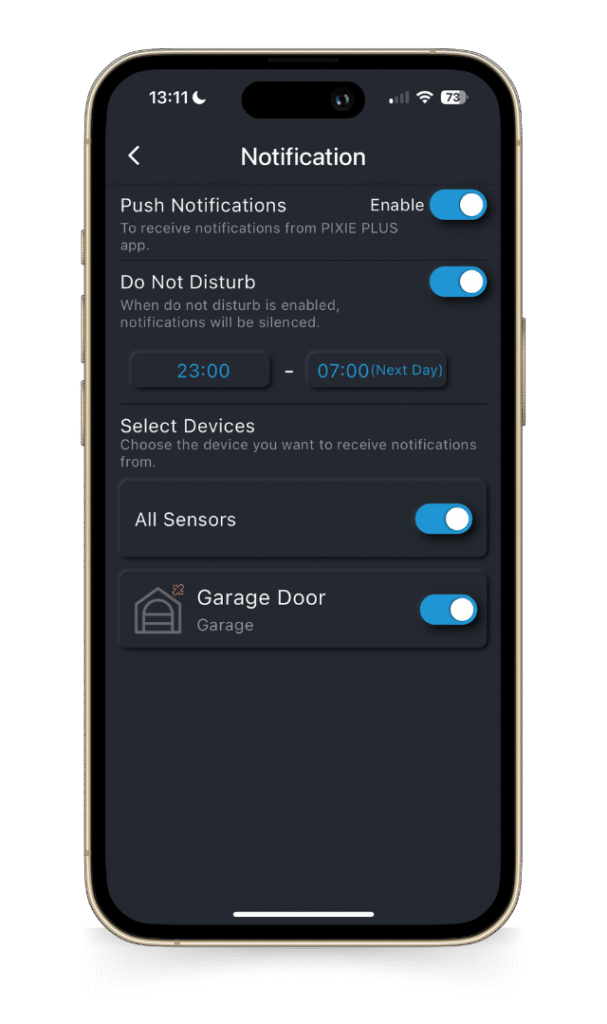
1Activate push notifications. #
Once the app and Gateway are updated, additional Notification controls will appear in the PIXIE PLUS settings.
- From the home page (Favourites), tap the three dots in the top right corner
- Open Settings, then Notification
- Toggle Push Notifications to Enable
- Toggle All Sensors to ON (this includes the Transceiver)
- Optionally configure Do Not Disturb for hours when alerts should be silenced
For smoke detector use specifically: leave Do Not Disturb OFF. A smoke alert at 2am is exactly when the notification matters most.
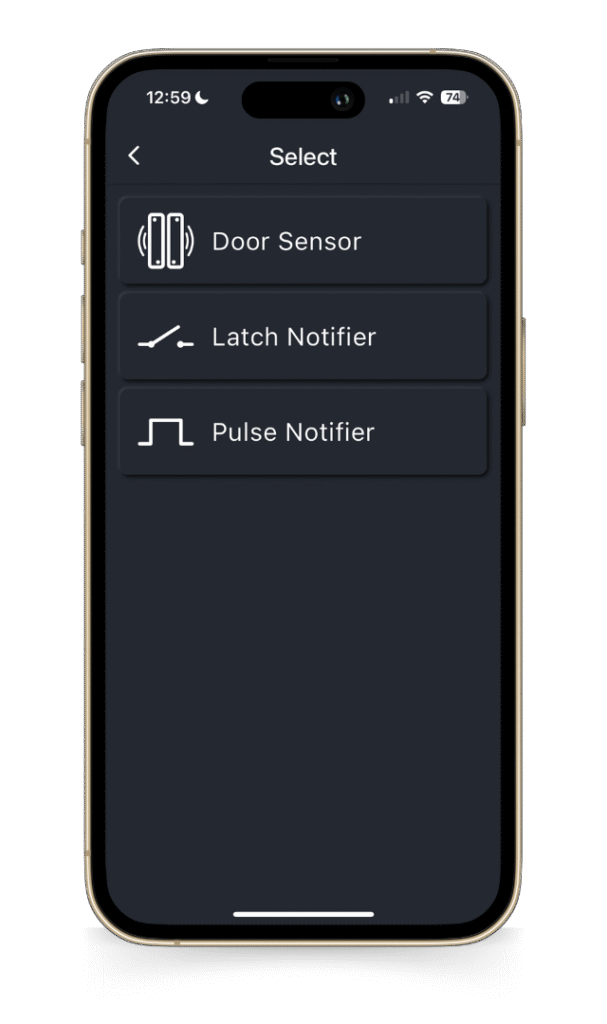
2Add the Transceiver, then re-add as a Notifier. #
This is the counter-intuitive step. The firmware update path requires adding the device first as a Door Sensor, then deleting and re-adding it as a Notifier. Follow exactly.
- Open Add Devices in the PIXIE PLUS app and scan for the new Transceiver
- When prompted to choose a function type, select Door Sensor
- Add the device, then run Update Master Device Firmware
- Once firmware is updated, factory reset the Transceiver: press the service button 9 times quickly within 2 to 3 seconds. The device flashes blue and white to confirm reset
- In the app, delete the device entry
- Open Add Devices again. The Transceiver appears with new options. This time choose Latch Notifier (recommended for smoke detectors) or Pulse Notifier (for the edge case explained below)
3Configure your custom messages. #
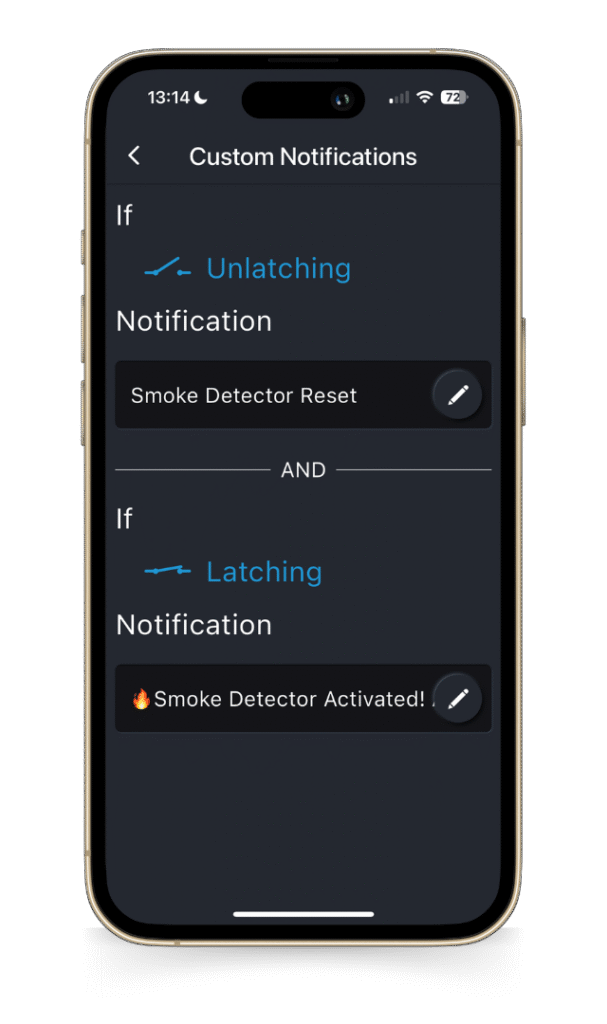
Each Transceiver can be named (for example, "Ground Floor Smoke Detector"), and each notification message is fully customisable, with emoji support.
For Latch Notifier, you write two separate messages:
- Latching message: fires the moment the alarm activates. Example: "🔥 Smoke Detector Activated! ALERT"
- Unlatching message: fires when the alarm deactivates. Example: "Smoke Detector Reset"
Emojis at the start of the message make the alert stand out among other phone notifications, which matters for genuinely urgent events.
4Wire the smoke alarm dry contact to the Transceiver. #
Refer to the Transceiver installation manual and your specific smoke alarm relay base or module documentation for terminal identification.
- Confirm the smoke alarm output is dry contact / volt-free. If it is mains-rated, fit the manufacturer's relay base first
- Connect the dry contact output (typically NO/COM on the relay base) to the Transceiver Contact Sensor input terminals
- Power the Transceiver from a 240V active and neutral feed
- Confirm the smoke alarm test triggers the Transceiver: an alarm test should fire your custom Latching push notification
Refer to the linked datasheets and wiring diagrams in the closing CTA. For PIXIE Certified Installers, on-site commissioning support is available; call 1800 256 843.
The alert. The device screen. #
Once setup is complete, this is what the system looks like in normal operation.
The device screen at a glance. #
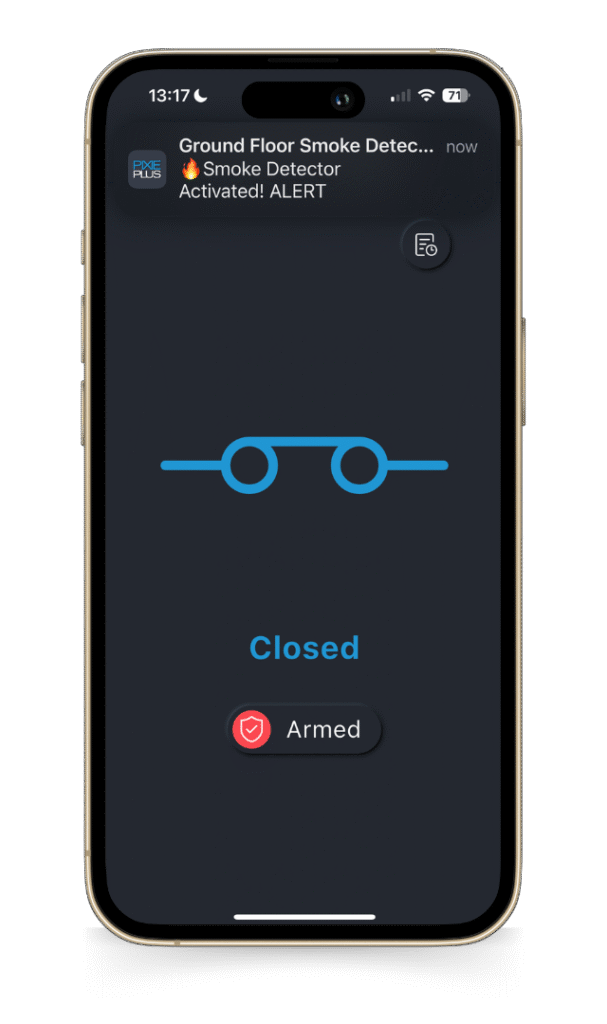
The Transceiver in the PIXIE PLUS app shows the contact state at the top (Closed = no alarm, Open = alarm active) and the operational state at the bottom (Armed in red, Disarmed in green).
The device LED on the Transceiver mirrors this state visibly: green when disarmed, red when armed. Useful for confirming arm state at a glance from across the room.
When a connected alarm triggers and the Transceiver is Armed, the custom Latching message fires to the phone immediately, named for the device that fired it (for example, "Ground Floor Smoke Detector"). The History log records every event for 7 days.
Latch or Pulse? For smoke detectors, use Latch. #
The Transceiver supports two Notifier modes. The choice depends on how the smoke alarm relay behaves when triggered.
Latch Notifier #
Use this for almost every smoke detector setup. Most Australian smoke alarm relays hold the contact closed for the duration of the alarm condition (latching behaviour). The Transceiver fires your Latching message when the contact closes and your Unlatching message when it reopens.
Two separate messages, two separate events. You know when the alarm activated, you know when it cleared. The History log captures both.
Compatible with: Clipsal 755RB, Clipsal 756, Red RRB, Brooks BA128, Cavius 9005 CAVRI, PSA LIFSAIR (latching mode), and most other dry contact smoke alarm outputs.
Pulse Notifier #
Use only if the smoke alarm relay outputs a brief pulse rather than holding the contact closed. The Pulse Notifier fires a single message when a pulse is detected. The pulse length is configurable from 1 to 20 seconds to accommodate alarms with specific pulse-output behaviour.
Pulse Notifier exists primarily for niche relay configurations and for non-smoke applications (garage alarms, security panel triggers, third-party alert outputs). For most smoke detectors, Latch is the right answer.
Use Pulse for: PSA LIFSAIR (pulse mode), some custom relay configurations, or any contact that outputs a momentary pulse rather than a sustained closure.
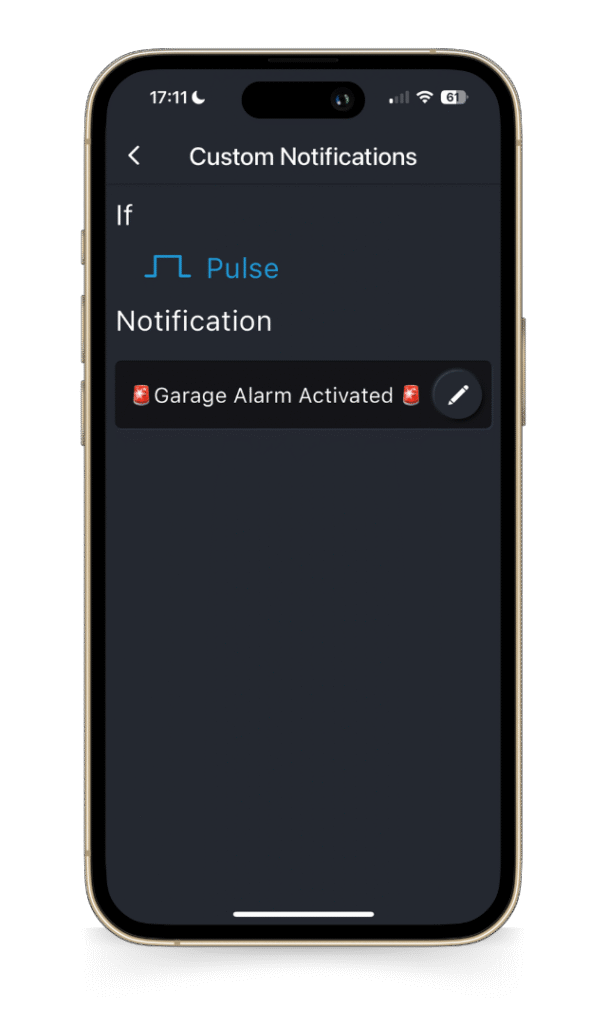
Pulse Notifier in a non-smoke context. #
The Pulse Notifier configuration screen shows a single customisable message that fires on each pulse event, with adjustable pulse-length tolerance.
The example above is a Garage Alarm trigger, which is a common Pulse Notifier use case. For smoke detection specifically, Latch Notifier is the better default.
Arm and Disarm. Notification fatigue, solved. #
The Transceiver has two operating modes: Armed and Disarmed. This is the primary control mechanism for managing when notifications fire. Smoke detectors are normally Armed 24/7, but the same logic supports temporal use cases (alarm systems on holidays, gates during business hours, motion alerts at night only).
Five ways to change Arm state #
The state is fully programmable. Choose whichever fits the household or installation.
Manual #
Tap the Armed/Disarmed pill on the device screen in the PIXIE PLUS app.
Multifunction Controller #
Pair a PIXIE Multifunction Controller (SMF/BTAS) to the Transceiver as a wall button.
Schedule #
Schedule arm/disarm by time of day or day of week. Useful for business-hours-only alarm monitoring.
Scene #
Include arm/disarm as part of a PIXIE scene. A "Goodnight" scene can arm motion sensors automatically.
PROGRAMode (THEN) #
Use as a THEN action in a PROGRAMode program. Geofence departure can arm the entire system on its own.
LED feedback #
The device LED is green when disarmed, red when armed. Visual confirmation across the room.
When notifications fire, when they don't #
The combination of Push Notifications, Sensors toggle, and Arm state controls exactly when alerts reach your phone.
| Configuration | Push Notifications | All Sensors | Arm state | Result |
|---|---|---|---|---|
| Smoke detector ready | ON | ON | Armed | Push fires |
| Detector temporarily silenced | ON | ON | Disarmed | No push |
| Sensors disabled in app | ON | OFF | Any | No push |
| Push notifications off | OFF | Any | Any | No push |
| DND active (during DND window) | ON | ON | Armed | Silenced |
The Transceiver is normally left Armed all the time for smoke detection. Disarming silences the alert path, so disarm only deliberately and briefly (for example, when testing the alarm or when a known activation is occurring). Status changes to Armed and Disarmed are themselves push-notified, so accidental state changes are immediately visible.
MASTER Link. Local response, even when the internet is down. #
Push notifications need internet. If the home internet is out, or the mobile network is congested, or the homeowner is asleep with their phone on silent, push alone is not enough for a critical safety event. MASTER Link is the local backup.
MASTER Link transmits directly over PIXIE Bluetooth Mesh from the Transceiver to other PIXIE devices or groups in the home. It does not depend on the Gateway, Wi-Fi, or the home network being intact. When the smoke alarm contact closes, MASTER Link fires its target action immediately, regardless of internet state.
Your home reacts even when nobody's watching the phone. #
- Mesh-only path. No internet dependency. No Gateway required for the action.
- Local execution is faster than the cloud round-trip for push notifications.
- Works during power outages provided the alarm and Transceiver are powered (battery-backed alarm units recommended).
- Belt and braces: MASTER Link triggers the visual response while the Gateway also sends the push notification.
Two prescribed MASTER Link scenarios for smoke detection #
Configure these as part of the standard smoke detector setup. They cost nothing extra and add meaningful safety value.
Always: flash all inside lights to 100% #
Configure MASTER Link so that when the smoke alarm contact closes, every interior light comes on at full brightness. If the household is asleep and the smoke alarm noise alone is not enough to wake everyone, the lighting change will. This works even if the internet is down.
On holiday: flash exterior lights, alert the street #
Arm the Transceiver only when away from home. Configure MASTER Link to flash the exterior lights on a smoke event. Neighbours and passers-by are alerted to a problem at the property. The Transceiver remains Disarmed during normal occupancy so this scenario only fires when the household is genuinely away.
MASTER Link on the Transceiver targets any PIXIE device or group, on Pulsed, Latched and/or Unlatched events depending on the Notifier mode. For full setup, see the MASTER Link guide linked in the closing section.
The 7-day History log. #
Every event is logged. The log is useful for confirming that the system is working as expected, for auditing arm/disarm behaviour, and for catching events that may have been missed in the moment.
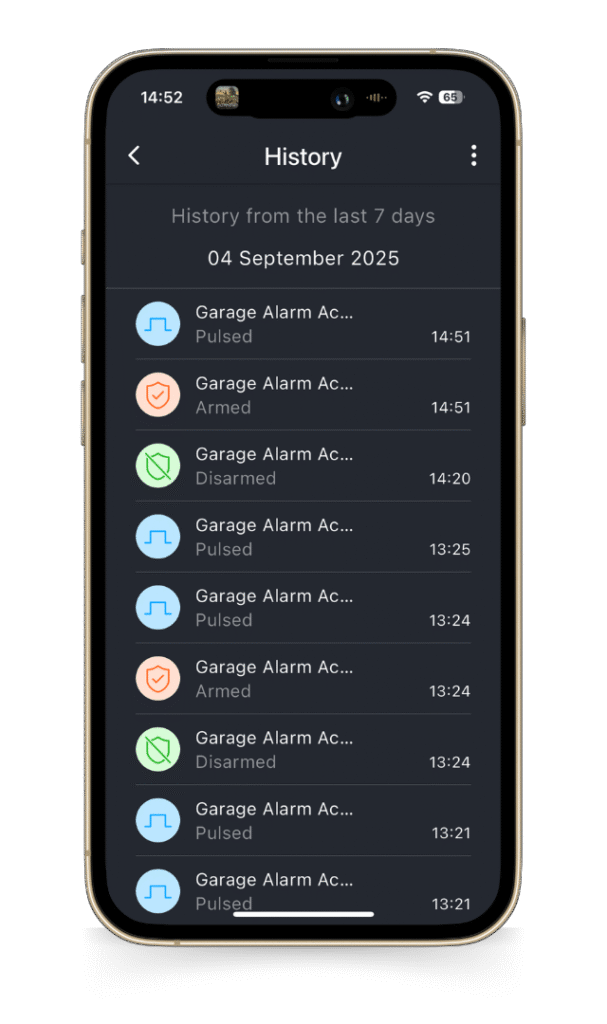
Seven days of everything that happened. #
The History log captures schedules, scenes, PROGRAMs, Notifier events (Latch, Unlatch, Pulse) and Arm/Disarm changes from the Transceiver, with timestamps.
Useful for:
- → Confirming a smoke alarm test fired correctly
- → Reviewing whether the system armed and disarmed as expected
- → Identifying nuisance triggers (steam, dust) for relocation decisions
Transceiver, not Translator. Two devices, very different jobs. #
PIXIE has two dry contact interface devices. The Translator and the Transceiver. They look superficially similar and both connect to the PIXIE Bluetooth Mesh, but they do quite different jobs. For smoke detection, the Transceiver is the right device.
Translator #
The Translator receives a dry contact closure and translates it into a PIXIE message. One dry contact input. When it closes, PIXIE responds locally.
No push notifications. The Translator does not send alerts. For smoke detection where remote awareness is the whole point, the Translator is the wrong device.
Translator's job: alarm system arming, AV scene triggers, legacy lighting bridge (CBUS, Dynalite), bell press integration. Where local-only response is enough.
Transceiver (this article) #
The Transceiver also accepts a dry contact closure, but its defining capabilities are push notifications and Arm/Disarm. When a connected device triggers and the Transceiver is Armed, the alert fires directly to mobile devices anywhere in the world.
Customisable messages, Latch/Pulse Notifier modes, scheduled arm/disarm, MASTER Link, 7-day history log.
For smoke detection, this is the device. Specify the Transceiver and the Gateway together.
Useful side benefit: both the Translator and the Transceiver act as passive Bluetooth Mesh boosters in the home. The Transceiver matches the SGB3BTAS booster's behaviour while doing its primary job. Position it where it doubles as a coverage extension.
Australian smoke alarms with dry contact outputs. #
The Transceiver requires a smoke alarm or relay base that provides a dry contact (volt-free) output. Two paths: alarms with native dry contact outputs, and existing 240V mains-powered alarms that can be retrofitted with a manufacturer's relay base or isolation module.
The information below is derived from the listed manufacturers' websites and product documentation. SAL PIXIE has not independently tested or verified these products for use with the Transceiver. Confirm compatibility, current part numbers and Australian availability with the manufacturer or supplier before specifying.
240V smoke alarms with dry contact relay bases or modules #
For mains-powered smoke alarms, a relay base or isolation module is added to provide the dry contact output that the Transceiver requires.
| Manufacturer | Part Number | Type | What it does |
|---|---|---|---|
| Clipsal (Schneider Electric) | 755RB | Relay mounting base | Optional base for Clipsal 755 series 240V alarms (e.g. 755PSMA4). Provides isolated changeover relay (NO/NC, dry contact) for integration with third-party devices, plus remote Test/Hush input. |
| Clipsal (Schneider Electric) | 756 | Smoke alarm isolation unit | Surface-mount add-on module compatible with Clipsal FireTek 755 series alarms. Provides isolated NO and NC dry contacts that close on alarm. |
| Red Smoke Alarms | RRB | Relay base | Mounting base for Red R240/R240RC series 240V alarms. Voltage-free changeover contact, configurable to activate on local alarm only or any interconnected alarm. Rated 250V AC, 2A. |
| Red Smoke Alarms | RRURF | RF relay unit | Standalone mains-powered relay module with 10-year lithium backup. Links to Red wireless or hardwired interconnected alarms. Volt-free NO/NC contacts rated 250V AC 5A. Up to 20 wireless and 40 wired interconnections. |
| PSA (Lifesaver Series) | LIFSAIR (Gen 2) | In-line relay module | For PSA Lifesaver 240V smoke, heat and CO alarms. Dry contact outputs (NO and NC), 240V AC / 30V DC at 5A. Selectable modes: latching, pulse, or CO-only. Operates even in mains failure via the interconnect line. |
| Brooks (Ei Electronics) | BA128 | 230V relay base | Surface-mount base with integral relay. Suits Brooks/Ei 140RC, 160e and 3000 series detectors. Isolated changeover contacts rated 250V AC, 8A resistive. |
| Cavius | 9005 CAVRI | Wireless family relay interface | 240V mains-powered relay unit with battery backup for Cavius Wireless Family alarms. Volt-free NO/NC relay output rated 250V AC at 5A. Includes a trigger input for activating alarms from external systems. |
Some smoke alarm ranges include a dry contact output as standard, which removes the need for a separate relay base. Confirm the specific model with the manufacturer and the Australian supplier before specifying. The relay base path above covers the most common Australian alarm brands and is the safest assumption for retrofit jobs.
Each of the above provides a dry contact (volt-free) output suitable for connection to the Transceiver. The same relay outputs can also drive other safety devices on a project: alarm panels, ventilation shut-offs, strobes and so on. All listed products are designed to meet relevant Australian standards for smoke alarms and accessories. Confirm with the manufacturer.
FAQ #
Do I need the PIXIE Gateway for smoke detector notifications? ▾
Yes, for push notifications. The Gateway is what relays the alert to the mobile device when the phone is out of Bluetooth range of the home (the most important case for smoke alerts). MASTER Link automations (such as flashing all inside lights to 100%) work without the Gateway.
SAL PIXIE app or PIXIE PLUS app? ▾
PIXIE PLUS only. The advanced notification features described here (Push Notifications, custom messages, Notifier modes, History log) are PIXIE PLUS features. The SAL PIXIE app does not expose these settings.
Latch Notifier or Pulse Notifier for smoke detectors? ▾
Latch Notifier in almost every case. Most Australian smoke alarm relays hold the contact closed for the duration of the alarm condition (latching behaviour), and Latch Notifier provides separate Latching and Unlatching messages. Pulse Notifier exists for the edge case where a relay outputs only a brief pulse (1 to 20 seconds, configurable).
Why do I have to add the Transceiver as a Door Sensor first? ▾
The Latch Notifier and Pulse Notifier modes require updated firmware. The firmware update flow is exposed only after the device is added in any role. Adding it as Door Sensor first is the path to get firmware updated, after which factory reset and re-add as the Notifier mode you actually want. This is a one-time onboarding step.
Will I get notified if the Transceiver is disarmed? ▾
Arm and Disarm state changes are themselves push-notified, so accidental disarms are immediately visible. Smoke alarm trigger events while Disarmed are not push-notified. Leave the Transceiver Armed for smoke detection use unless you have a specific reason to disarm.
What happens if the internet is down? ▾
Push notifications require internet. They will not reach the phone while the home internet is down, or the mobile network is unreachable. MASTER Link does not depend on internet: configure MASTER Link to flash all inside lights to 100% on a smoke event, and the local response still fires regardless of internet state. The History log records the event locally and the push will deliver when connectivity returns.
Can I connect more than one smoke alarm to one Transceiver? ▾
The Transceiver has one dry contact input. Multiple alarms are connected by interconnecting the alarm system itself (most modern Australian smoke alarms support interconnection between units), then taking a single dry contact output from the relay base or RF relay unit to the Transceiver. When any alarm in the interconnected system triggers, the relay closes and the Transceiver fires.
For larger properties or zones that need separate notifications (Ground Floor Smoke vs First Floor Smoke), use one Transceiver per zone with a separate dry contact feed and a separate device name in the app.
Can the Transceiver be used for non-smoke applications? ▾
Yes. The Transceiver is a general-purpose dry contact monitor with push notifications. Other common uses: alarm system arm/disarm notifications, gate and door sensors, motion alerts, intercom and doorbell triggers, generator status, water level sensors, garage alarm panels (Pulse Notifier), and any device with a dry contact output where remote awareness matters.
Can the Transceiver damage be repaired if a mains output is connected by mistake? ▾
No. Connecting a mains-rated relay output (240V AC) to the Transceiver dry contact input is destructive and not field-repairable. Always confirm the smoke alarm output is dry contact (volt-free) before connection. If the smoke alarm only outputs mains, fit the manufacturer's relay base or isolation module first.
How long is the History log retained? ▾
7 days. The log captures schedules, scenes, PROGRAMs, Notifier events and Arm/Disarm changes. Useful for auditing system behaviour, confirming alarm tests fired correctly, and identifying nuisance triggers.
Does the Transceiver work with Mitsubishi Electric, Daikin or Mitsubishi Heavy Industries air conditioners? ▾
Air conditioner integration uses a different range of devices. For Daikin ducted, see the CLIMATIQ Daikin support doc. For Mitsubishi and MHI, see the corresponding integration products. The Transceiver is specifically for dry contact monitoring and push notifications, not AC control.
Datasheets, wiring diagrams and the rest of the knowledge base. #
Everything you need to specify, install and support a smoke detector integration on a PIXIE job, in one place.