
Running a venue's lighting without an integrator on speed dial
How PIXIE delivers the same venue outcome as C-Bus®, Dynalite® and KNX® in pubs, clubs, restaurants and hotels, in a new fit-out or a retrofit, with far less to install and far less to maintain.
Written for the electrical contractor and the fit-out consultant who specify venue lighting control. The venue owner will want to read it too, and the section for the IT department is written to be forwarded as it stands.
Three things to take away.
The full article is below. If you only have two minutes, here is the short version.
The outcome is right with a wired bus system. The dependency and the running cost are the problem.
Lighting that changes on a timetable, every day.
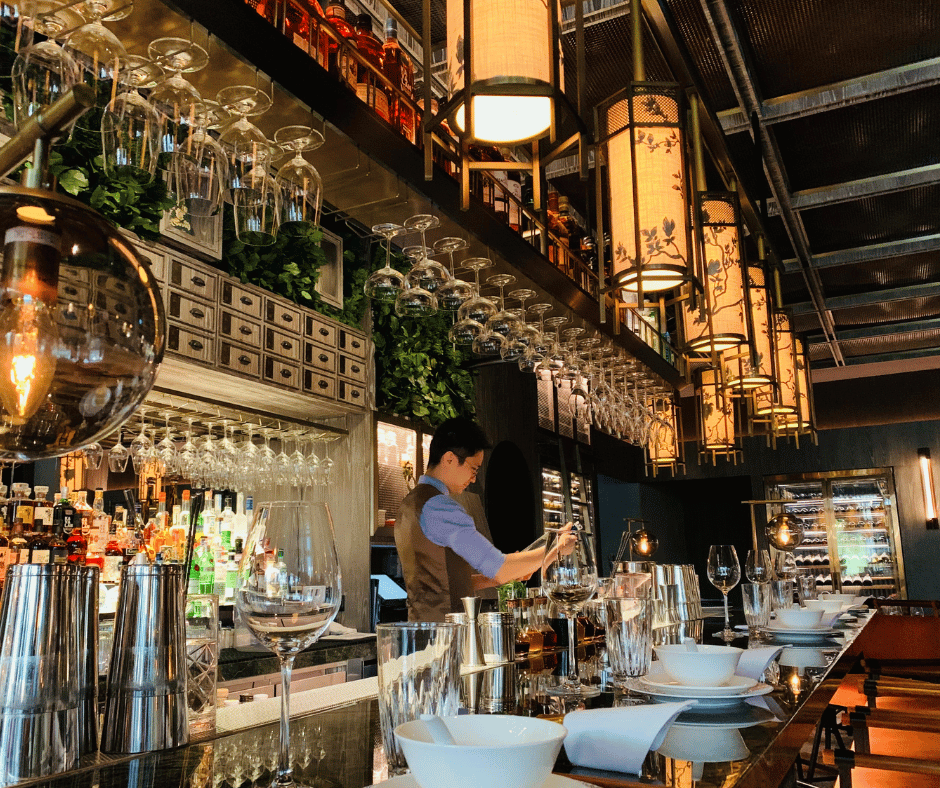
A hospitality venue's lighting has one job that a house never asks of it: change on a timetable, every day, without anyone touching it. Lunch trade wants the bistro bright and the sports bar lively. By late afternoon the dining room warms down. Dinner service runs lower again, the function room follows its own clock, and at close the floor lifts to full for the cleaners before the whole building settles to after-hours and security lighting. That cycle repeats seven days a week, and if it slips the venue feels wrong before anyone can say why.
For twenty years the way to deliver that has been a wired bus system. C-Bus®, Dynalite® and KNX® all do the job, and do it well. The problem is everything that comes with them: a dimmer rack in the comms room, a proprietary bus cable to every switch, a programmer with a laptop and a licensed software suite, and a service call every time the manager wants Friday night a touch warmer.
This article sets out how PIXIE delivers the same venue outcome with a different architecture. It covers the dimming hardware, how the system is held together over wireless and the venue's IP network, how managers are given control and have it taken away, and the network brief the venue's IT people will ask for.
What a venue actually needs.
Strip the brand names away and a hospitality lighting control system has to do six things. Everything that follows is measured against this list.
How PIXIE is built for a venue.
PIXIE is a Bluetooth® mesh control system. Every device on the wall or in the ceiling talks to every other device directly, so there is no bus cable, no head-end and no single box that takes the venue down when it fails. Over the top of the mesh sits the PIXIE Gateway, which puts the system on the venue's IP network for site-wide control, schedules and remote access, and the touch panels that give staff a wall-mounted control point.
Three load-control building blocks cover the lighting a venue actually has.
DALI2® broadcast controller
PC155DLB-R-BTAMFor fittings on DALI® or DALI2® drivers, which is most new downlighting, pendants and linear LED in a current fit-out. One controller runs one area or channel and broadcasts the level to every driver on it. That is a deliberate choice, not a limitation: a venue wants the bistro ceiling to dim as one, and broadcast does that without commissioning every fitting with an individual address. DALI2® certified, and dims any DALI® or DALI2® dimmable driver.
Trailing edge dimmer
SDD300BTAMFor fittings that are phase-dimmable: existing downlights in a retrofit, feature lamps, pendants over the bar. Keep multi-gang wall plates to three gang or fewer, allow for multi-gang derating, and fit a SILC1235BTP inrush suppressor on heavily loaded phase-dim circuits. Where off-peak hot water ripple tones are a known problem, the SDD400RSBTAM RippleShield dimmer removes the flicker at source. It works with compatible light sources only, so check the load against the RippleShield compatibility list before specifying it.
Dual relay controller
PC206DR-R-BTAMSignage, external and car park lighting, cool room and back of house, exhaust, feature lighting that is either on or off. Two independent channels per controller. Alongside the three building blocks, LED strip controllers handle RGB, CCT and tunable white strip in bulkheads and bar fronts, and the 0-10V controller covers any 1-10V drivers a venue has inherited.
No switch wire between control point and load
This is the retrofit story in a sentence. A PIXIE smart switch or dimmer mech needs only an active and a switch wire at its location, with no neutral. A PIXIE multifunction controller needs only an active and a neutral. Either way, from that one point it drives relays, DALI2® controllers and dimmers anywhere on the mesh with no physical connection between the control point and the load. In an existing venue that means a new control point goes wherever there is power, with no chasing walls, no bus cable and no pulling back to a rack. Where there is not even power at the spot, a battery remote mech does the same job.
Sensors where staff never go
Restrooms, corridors, store rooms and the loading dock are where a venue burns energy for nobody. PIXIE PIR sensors (indoor ceiling mount, and IP66 outdoor wall mount with photoelectric sensing) switch and dim those areas on occupancy, with their own 24/7 schedule so the restrooms behave differently at 2 pm and 2 am. On a wired bus system this is usually an extra module and more programming. On PIXIE it is a sensor on the mesh.
Range across the whole venue
A Bluetooth® mesh grows with every device added, and most venues are dense enough with controllers that coverage looks after itself. Where a venue needs help, the SGB3BTAS Mesh Booster is the tool: a small device that sits hidden in a ceiling space or behind a plate, dotted around the venue wherever coverage thins out behind thick masonry or across a wide floor. A scan adds it to the network. There is no configuration and nothing to commission. For the alfresco deck, the car park or the bottle shop across the yard, the PIXIE Portal bridges up to 120 metres in one direction.
The Gateway and touch panels
The Gateway bridges the mesh to the venue's IP network. That is what gives the venue site-wide scenes and schedules across every area, remote access for the operator who is not on site, voice control, and the touch panels. Each PIXIE Ambience Touch Panel runs on CAT6 back to a PoE switch on the same subnet as the Gateway and shows every area across every Gateway natively, secured by PIN. An iPad can do the job but has to be swapped between Gateways by hand; the touch panel does not.
A trading day that runs itself.
A venue with a bistro, a sports bar, gaming and an alfresco deck might run a day like this. Every transition is a PIXIE schedule: 24 hours, 7 days, per area, set once in the app or on the touch panel.
| Time | Bistro | Sports bar | Gaming | Alfresco | Restrooms and BOH |
|---|---|---|---|---|---|
| 10:00 Open | Bright, cool | Bright | House level | Full | Sensor, full on occupancy |
| 14:30 Afternoon | Warm down 20% | Hold | House level | Full | Sensor |
| 17:30 Dinner | Dinner scene | Lively, screens up | House level | Dusk scene | Sensor |
| 21:00 Late | Low, feature only | Late scene | House level | Low | Sensor, dimmed on occupancy |
| 00:00 Close and clean | Full | Full | Full | Off | Full |
| 01:00 After hours | Off, security on | Off, security on | Off | Off | Sensor, security |
The function room sits outside the schedule on its own scenes, so a wedding that runs late does not fight the rest of the building. Staff override at the touch panel when they need to; the next scheduled scene brings the area back in line.
PIXIE scheduling is time of day. It does not have native sunrise and sunset tracking; if a venue wants the alfresco to follow dusk rather than a clock time, that is delivered through Google™, Amazon Alexa™ or IFTTT® via the Gateway. And the schedules live on the devices, not in the cloud, so they run whether or not the internet is up. The Gateway keeps the clock accurate, the mesh does the rest.
Who is in control, and who is not any more.
A bus system gives the venue a keypad with a PIN, or a laptop the integrator holds. PIXIE gives each manager their own PIXIE PLUS login, and the Gateway's access control decides what that login can do.
Admin account
- Belongs to the venue owner or general manager
- Full control, always
- The only account that sets anyone else's permissions
- Adds Members by email invite or by a QR code scanned on site
- Removes a Member instantly, leaving them with no access to anything
Member accounts
- Scoped by the Admin to the devices they may operate
- The whole venue for the duty manager
- The function room only for the events coordinator
- The bar and gaming floor for the shift supervisor
- Each has a per-person remote access toggle the Admin controls
The piece venues care about most is the remote toggle. On, and a Member can operate their permitted devices from anywhere through the PIXIE PLUS app. Off, and they can only operate them while physically within mesh range of the Gateway, which means on the premises.
A manager who is rostered off, on leave or no longer with the business is switched off or removed without touching anyone else's access, and nobody is sharing a four-digit code written on the back of the bar. For a multi-venue group that is the difference between an operations manager who can see and adjust every site from one account, and one who rings the integrator for each.
Reference: PIXIE Gateway Admin and Member Access Control guide (PDF)
PIXIE against C-Bus®, Dynalite® and KNX®.
Same venue outcome. Different architecture, different dependency, different running cost.
If the venue needs full building management integration with HVAC and fire systems on one head-end, per-fitting addressable DALI® with individual fault reporting, or emergency lighting monitoring through the same platform, those are the jobs C-Bus®, Dynalite® and KNX® were built for and PIXIE does not pretend to replace them. For the venue that needs its lighting to run the trading day, respond to staff, and be adjustable without a service call, PIXIE delivers that outcome with far less to install and far less to maintain.
Twenty minutes with IT before install day.
Contractors: the block below is written to be forwarded to the venue's IT provider as it stands.
PIXIE Gateway network requirements
The PIXIE Gateway needs three things from the venue network, and nothing else.
A place on the venue LAN, on the same subnet as the touch panels. The PIXIE Ambience Touch Panels discover the Gateway on the local subnet. Put them on a guest VLAN or behind a different subnet and they will not see it. Gateway and touch panels on the same subnet is PIXIE's recommendation and the configuration PIXIE supports.
Outbound internet access from the Gateway. The Gateway makes outbound connections only. It needs NTP for time, which is what keeps every schedule in the venue accurate; a Gateway with no time source will drift and the dinner scene will not land at 5:30. It also needs outbound HTTPS to the PIXIE cloud for remote access and voice control. PIXIE does not ask for inbound port forwarding or a VPN.
Nothing else. No server on site, no agent on a PC, no integration with the venue's POS or Wi-Fi.
Why the hotspot workaround is a bad outcome
When IT blocks all outbound traffic, the contractor is left with one option on the day: pair the Gateway to a phone hotspot to commission it, get the touch panels talking, then move it back onto the locked-down LAN. The venue ends up with a Gateway that has no time source, no remote access for the operator and no voice control, and a set of touch panels that stop working the first time someone tidies up the VLANs. PIXIE will run without internet, because the mesh and the schedules are local, but the venue is paying for capability it cannot use. Twenty minutes with IT before install day avoids all of it.
Data
PIXIE's cloud services run on Amazon Web Services® in Australia, so venue data stays onshore and Australian data sovereignty is maintained. The PIXIE PLUS app's privacy declaration on the Apple® App Store® is "Data Not Collected", and the same declaration applies on Google Play™. There is no subscription and no third-party analytics in the app.
From schedule to switchboard.
PIXIE sells through electrical wholesalers and is installed by PIXIE Certified Installers. For venue work, PLATINUM PIXIE Certified Installers provide on-site commissioning support and have a direct line to PIXIE engineers.
For venue design support, contact the PIXIE team. We prepare venue lighting-control take-offs from a client schedule or an existing C-Bus® control schedule, mapped channel for channel to PIXIE devices with a bill of materials the wholesaler can price. Consultants and engineers specifying a venue can work from the PIXIE Engineering Specifications page and the Engineering Specification Reference for Smart Homes and Smart Spaces (PDF).
The lighting runs the trading day on its own, the duty manager can change it, and nobody needs an integrator on speed dial.
That is what PIXIE delivers in a venue, whether it is a new fit-out or a C-Bus® system that has reached the end of its service contract.
Pricing a venue, or inheriting one?
Start with the Smart Spaces hospitality resources, the engineering specification, or a conversation with the PIXIE team about venue design support.
PIXIE, PIXIE PLUS, Smart Spaces and RippleShield are trademarks of SAL National Pty Ltd. C-Bus is a registered trademark of Schneider Electric. Dynalite is a registered trademark of Signify Holding. KNX is a registered trademark of KNX Association. DALI and DALI-2 are registered trademarks of the Digital Illumination Interface Alliance. The Bluetooth word mark is a registered trademark owned by Bluetooth SIG, Inc. Google and Google Play are trademarks of Google LLC. Amazon Alexa and Amazon Web Services are trademarks of Amazon.com, Inc. or its affiliates. Apple and App Store are trademarks of Apple Inc. IFTTT is a registered trademark of IFTTT Inc. All other names are the property of their respective owners and are used for identification only.